
 Objects, Events and Tasks to be
Created
Objects, Events and Tasks to be
Created 
How to implement error handling for a message type, in this case XAMPLE:
· Create a new object type IDOCXAMPLE as a child of the object type IDOCAPPL in the Business Object Repository (BOR). Customers should use the name ZDOCXAMPLE.
· Create a new standard task, named "XAMPLE_Error".
· Create event-couplings linking IDOCXAMPLE’s event inputErrorOccurred to your standard task, and event inputFinished to the function module for completing work items.
In each case it is easier to copy an existing object type or standard task.
To provide a fully ALE-compatible interface, you will also need to:
· Create a new object type IDPKXAMPLE as a child of the object type IDOCPACKET Customers should use the name ZDKXAMPLE.
· Maintain your inbound process code to refer to the above objects and events
The example of the material master record IDoc MATMAS explains how the above objects are created.
The attributes of object type IDOCMATMAS are used to define the standard task so that the error message and the material number appear in the work item text.
The methods and events used are as described above.
Object type IDOCMATMAS:
Attributes, methods and events relevant to the inbound function module.
|
Name |
From IDOCAPPL |
Meaning |
Attributes |
ShortMessage |
Yes |
First 50 characters of the IDoc status message |
|
ApplicationObjectID |
Yes |
ID of ALE link object in IDoc |
Method |
InputForeground |
Yes |
Processes IDoc starting with status display |
|
InputBackground |
Yes |
Processes IDoc without any dialog |
Event |
inputErrorOccurred |
Yes |
Triggered when direct application handover failed; not triggered by the methods InputForeground and InputBackground |
|
inputFinished |
Yes |
Triggered when IDoc successfully processed, or user flags IDoc for deletion |

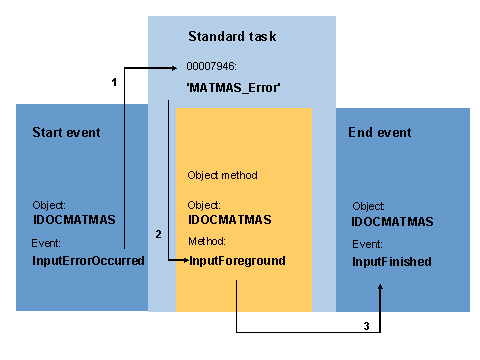
An example of an ALE error handling.
The arrows show the three stages:
· The event inputErrorOccurred causes a work item to be created.
· When the user executes the work item, the method InputForeground is invoked.
· If the IDoc has been successfully processed, or flagged for deletion, the event inputFinished is triggered, which terminates the work item.

Before continuing, have a look at object type IDOCMATMAS in the Business Object Builder and at standard task 7946.
To access the business object builder and the standard task, choose Tools ® Business Workflow ®Development, followed by Definition Tools ®.
® Business Object Builder and
® Tasks/Task Groups
For further information, see the application help.