
 Getting Started with Individual
Objects
Getting Started with Individual
Objects 
Purpose
Before you can create individual objects using the object maintenance functions, there are a number of steps that need to be performed. These are outlined below, together with the relevant functions.
Process Flow
...
1. Define an object family.
To do this, execute the IMG activity Define Object Families in the implementation guide under Cross-Application Components ® SAP Product ® Individual Objects.
2. These entries are client independent.
See the example below, showing categories, set types, and attributes:

In this step, you start by defining the attributes you require. To do so, choose in the user menu (SAP GUI) Master Data ® Products ® Maintain Set Types and Attributes. Select Attribute and create the attributes you require.
For more information about working with attributes, see Set Types and Attributes.
3. Define the set types you require to describe your individual objects and assign them the necessary attributes. To do so, choose in the user menu (SAP GUI) Master Data ® Products ® Maintain Set Types and Attributes. Select Set Type and create the set types you require.
For more information about working with set types, see Set Types and Attributes.
4. The attributes you have created are stored as data elements in the ABAP Dictionary and the set types as structures and tables.

To transport the set types to
another system (normally only necessary for testing the API interface), you
now need to include the set types in API structures and transport them.
To do this, from the
Maintain
Set Types and Attributes
screen you choose Set Types/Attributes ® Transport ® Set Type. Make the
relevant entries and then choose Include in Transport Request.
For more information about transporting set types, see Transport Set Types to Productive Systems.
5. Create the categories and hierarchies you require for your object families. At least one of these categories must be created within the base hierarchy for the product type Material and then assigned the relevant object family.
For more information about working with categories and hierarchies, see Categories and Hierarchies.
Examples of the options for setting up your categories and hierarchies for individual objects are shown below:
Example 1
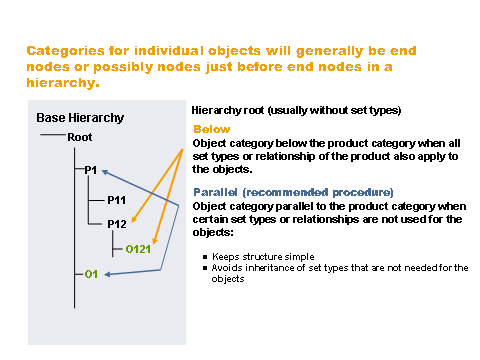
Example 2

Note that categories you create are specific to the client in which you are working, but are required in each client in which the object family is used.
To transport a hierarchy from one client or system to another, execute the IMG activity Transport Categories (in the Customizing of the Cross-Application Components under SAP Products ® Product Category).
6. Enter the object family in the table COMC_SETTYPE_BSP for the application CRMM_PRD_IOBJECT. To do this, execute the IMG activity Register Applications for Set Type Generation (People-Centric UI) in the Customizing of the Cross-Application Components ® SAP Products ® Basic Settings.
7. Define the number ranges for internal and external number assignment. To do this, execute the IMG activity Define Number Ranges for Materials (in the Customizing of the Cross-Application Components under SAP Products ® Settings for Product Type ® Number Assignment).
8. Reserve set types for an object family (optional).
A set type can be used for products and individual objects. However, if one of the fields in a set type contains data that is only relevant for an individual object, you can reserve this set type for individual objects. The set type can consequently only be used for individual objects belonging to this object family and cannot be used by products or objects belonging to other object families.
To do this, enter an object family in the Object Family field for the relevant set type in set type maintenance.
Note that when you create individual objects, you first select an object family. This assignment cannot be changed later.
For more information about using individual objects in the installed base area, see in the Implementation Guide (IMG) of the Cross-Application Components underSAP Product ® Individual Objects ® Define Object Family.