
 Customer Service and Support with Interaction Center
Purpose
You can use this business process to collect, plan, and dispatch to your service organization all customer service requests that are reported across multiple communication channels such as telephone, e-mail, and fax. Agents can:
· Create service requests
· Assist with customer inquiries
· Create or extend service contracts
· Schedule service visits for field service technicians
Process Flow
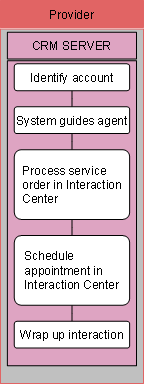
The following business process runs in SAP CRM:
...
1. Identify account
For
information about this business process step, see  Information Help
Desk.
Information Help
Desk.
2. System guides agent
For
information about this business process step, see Information Help
Desk.
3. Process service order in Interaction Center
To initiate resolution of the issue, the agent creates a service order directly from the interaction center. The agent enters all available information, such as the service to be provided to the customer, any spare parts to be sent to the customer, any special invoice recipients that the customer might have mentioned, and the reference object to which the issue relates. Based on this reference object, the system automatically checks if there is any valid warranty or signed maintenance contract. If there is, the information is copied to the service order automatically to ensure that it is taken into consideration during the subsequent billing process.
4. Schedule appointment in Interaction Center
If a field service technician needs to visit or call the customer, the agent can offer an appointment based on both the customer’s preferred time window and the planning constraints of your service organization. The agent does not have to contact the customer again at a later date to notify him or her of the appointment date and time, nor does the customer have to wait for the agent to contact him or her with appointment information. The agent saves the appointment to the service order.
5. Wrap up interaction
For
information about this business process step, see Information Help
Desk.