
 Managing Structure Gaps
Use
When you remove a component of the type product or individual object from the structure of an individual object, you decide between the following options:
· Removing the component permanently
To do this, you cut the component and do not reinsert it.
· Generating a placeholder that you later replace with the current or a different component
To do this, you dismantle the component. A component of the type structure gap appears in place of the dismantled component.

You can also
insert a structure gap as a component directly, in the same way as you insert
other components.
This section, however, discusses the special features you need to consider if
a structure gap is to be generated by the system.
Prerequisites
A component of the type structure gap is available for installation purposes at the required position.
Features
Dismantling or installing a component involves, technically, changing the component type:
· When a product is dismantled, the component type changes from product to structure gap, for example.
· When an individual object is installed, the component type changes from structure gap to individual object, and so on.
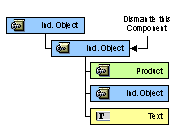
The components of the two types product and individual object behave differently when you dismantle them from the structure. The table below illustrates these differences:
Component Type |
Product |
Individual object |
1. Before dismantling the component
|
|
|
A component of the type product contains subcomponents. |
A component of the type individual object contains subcomponents. |
|
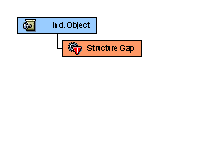
2. After dismantling the component |
|
|
The component itself becomes a structure gap, its subcomponents remain the same. |
The component and all its subcomponents become a structure gap. |
|
3. After installing a component |
|
|
When a different component (here individual object) is installed, the structure gap and subcomponents are covered by the new branch. |
When a different component (here product) is installed, the structure gap is replaced by the new branch. |
|
4. Dismantling the component again |
|
|
When the new component is dismantled again, the subcomponents of the original product are displayed again. |
When the new component is dismantled again, the original subcomponents disappear. |



Activities
Dismantling Components
...
1. In the object structure, select the component that you want to dismantle.
2. Dismantle the component.
The component is replaced by a component of the type structure gap. Depending on whether the dismantled component is a product or an individual object, the subcomponents either remain visible or are removed.
3. Save your changes.
Installing Components
1. In the object structure, select the structure gap that you want to replace with a component.
2. In the object structure, choose Install.
3. Decide whether you want the component type of the new component to be product or individual object and enter the required data.
4. In the lower screen area, choose Install.
The structure gap is replaced by the new component.
5. Save your changes.