Products Proposals in CRM
E-Commerce
Products Proposals in CRM
E-Commerce 
Use
You use  product proposals
in your Web shop to get your customer’s interest and encourage further
buying.
product proposals
in your Web shop to get your customer’s interest and encourage further
buying.
Integration
Product proposals are integrated with the product master data in CRM and business partner segmentation (Segment Builder) in CRM Marketing.
Prerequisites
You have set up product proposals in your SAP CRM system. For more information, see the SAP Library under Customer Relationship Management ® Components and Functions ® Marketing ® Product Proposals.
Features
The following product proposal types are available in the Web shop:
Product Proposal Type |
Description |
Top n product lists |
You use top n product lists to create the following proposals: ● Global product recommendations Special offers available to all Web shop customers. You create top n product lists, assign them to a global target group, and assign the target group to your Web shop. In the Shop Management application, you enable global product recommendations, and the target group on the Marketing tab page. The global product proposals are then displayed to customer as Special Offers in the Web shop. |
Cross-/up-/down-selling
|
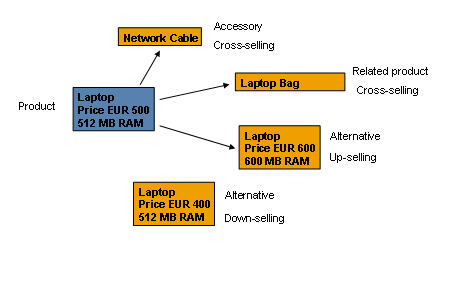
You use this marketing function to propose cheaper or more expensive products as alternatives or additions to another product or products. The products proposed by this function are split into three categories in the Web shop: ● Accessories Product-related cross-selling items that can be maintained in the product master data and also in the product catalog. Accessories are available to all Web shop customers, and are displayed on the product details page and in the shopping basket under the main item. ● Related Products Cross-selling item sold in addition to the main product. Related products can be global, for all your Web shop customers, or personalized, for particular target groups and customers. Related products are displayed on the product details page and in the shopping basket under the main item. ● Alternatives Cross- or down-selling item proposed as an alternative to the main product. Alternatives can be global, for all your Web shop customers, or personalized, for particular target groups and customers. Alternatives are displayed on the product details page and in the shopping basket as separate items. All these products are maintained in the product master and the product catalog. You can determine whether you wish to display them, and which ones you wish to display, in the catalog in a particular Web shop by using method schemas. You create method schemas in Customizing for Customer Relationship Management under Marketing -> Product Proposals -> Create Method Schema. You assign the method schema to the Web shop in the Shop Management application on the Marketing tab page, in the Method Schema field. For more information on creating Method Schemas, see the SAP Library under Customer Relationship Management ® Components and Functions ® Marketing ® Product Proposals. |
Example
An example of cross-/up- and down selling products is depicted in the figure below.