Localizing Errors
The preview function that is available when you process a DataSource enables you to identify potential problems before you actually load the data. If you notice from the preview that the data is incorrect, the following options are available to help you localize the error:
...
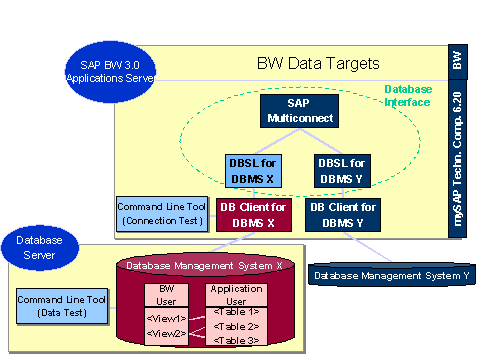
1. In the database management system (DBMS) use a SELECT command for a view to check which data is going to be delivered. Using a command-line tool on the database server, for example SQLPLUS for Oracle or db2 for IBM DB2/390, you can use this same SELECT command to test whether the data that has been read is correct or not. If you discover an error, remove it from the DBMS.
2. If the error is not in the DBMS, use one of the command-line tools on the BW application server to establish a connection as a BW user to the DBMS. Use the SELECT command to test whether the DB client on the BW application server can see the data and whether this data is correct. If the DB client cannot see the data, it is likely that there is an error in the connection.
3. If the DB client on the BW application server can see the data, and this data is correct, the error is in the BW system.