
 Manual
Planning and Disposition of Waste Disposal Orders
Manual
Planning and Disposition of Waste Disposal Orders 
Use
With this business process, you can allocated vehicles and routes to waste disposal orders. You can also schedule staff for the orders.
Prerequisites
You must have configured vehicles and work centers for the route.
Process Flow
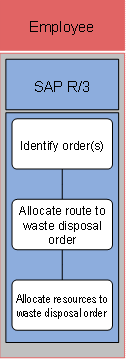
1. Identify waste disposal order
You must identify the waste disposal order before you can plan it. You can identify a specific waste disposal order by the route. You must have defined the waste disposal order first.

You can search for a waste disposal order using the following attributes:
§ Contract data (for example, business partner)
§ Regional structure (for example, postal code)
§ Customer fields (customer-defined attributes)
2. Allocate route to waste disposal order
If you do not specify a route when creating waste disposal orders, you can enter it later in the route allocation. You can also allocate the route to other waste disposal orders.
You can plan a waste disposal order as follows:
a. Select the relevant order (multiple selection possible)
b. Choose the Route Allocation pushbutton
c. Select a route
d. Select one or more order items
e. Choose the Reallocate pushbutton
f. Save your entries
You have now allocated a route to a waste disposal order.
3. Allocate resources to waste disposal order
Once you have allocated a route to a waste disposal order, you can plan the resources for the order. To do so, proceed as follows:
a. Select the relevant order (multiple selection possible)
b. Choose the Resource Planning pushbutton.
c. Enter an order text
d. Choose a work center
e. Select the person who contributes or has contributed to the creation of goods or services. The employee data is integrated into the SAP component Human Resources (HR).
f. Choose the vehicle that you need for the planning. Vehicles are created as equipment in Plant Maintenance (PM).
g. Choose the Status pushbutton to set the status to Planned
h. Save your entries
The crew planning is now complete.