
 Processing Move-In
Purpose
You can use this business process to create a move-in in the Interaction Center (IC) Web Client of a utility company.
Process Flow
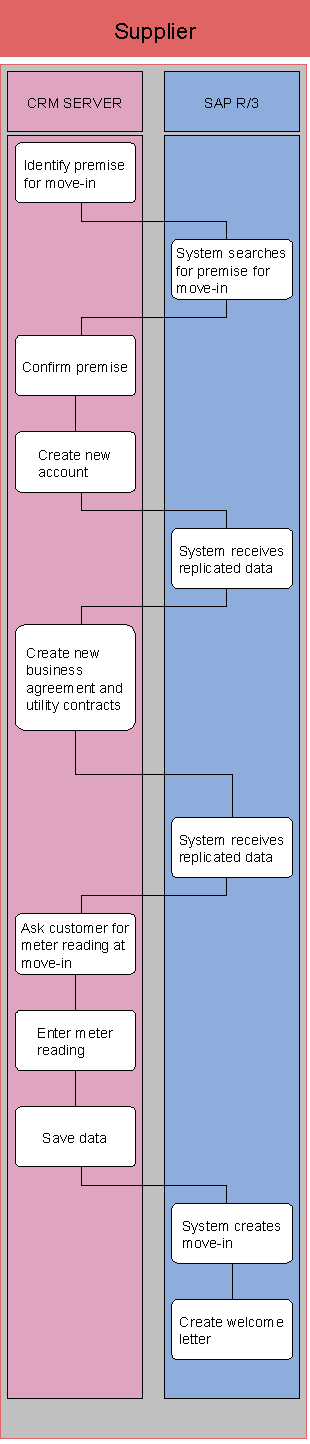
The business process runs as follows:
Verbrauch...
1. Identify premise for move-in
2.
System searches for
premise for move-in
The premise relevant to the move-in is searched for in SAP IS-U.
3. Confirm premise
4. Create new account
5.
System receives replicated
data
SAP IS-U receives changed data from SAP CRM.
6. Create new business agreement and utility contracts
7.
System receives replicated
data
SAP IS-U receives changed data from SAP CRM.
8.
Ask customer for meter
reading at move-in
You ask the customer to provide the meter reading at the time of
move-in.
9. Save data
10.
System creates move-in
In SAP IS-U, a move-in is automatically executed, which links the utility
contract with the installation.
11.
Create welcome letter
Once the move-in has taken place, you can create a welcome letter, which you
send to the customer from SAP CRM.
Result
You have create a move-in, entered the current meter readings, created a welcome letter, and sent it to the customer.