VirtualProviders with Function
Modules
VirtualProviders with Function
Modules 
Definition
A VirtualProvider with a user-defined function module that enables the data in the VirtualProvider to be read from another system.
The properties of the data source can be defined more precisely using a number of options. Depending on these properties, the Data Manager provides services for converting the parameters and data.
Use
You use this VirtualProvider if you want to display data from non-BI data sources in BI without having to copy the dataset into the BI structures. The data can be either local or remote. You can also use your own calculations to change the data before it is passed to the OLAP processor.
This function is used primarily in the SAP Strategic Enterprise Management (SEM) application.
In comparison to other VirtualProviders, this VirtualProvider is more generic. It offers more freedom, but also requires more implementation effort.
Structure
You specify the type of the VirtualProvider when you create it. If you choose Based on Function Module as the type for your VirtualProvider, an extra Detail pushbutton appears on the interface. This pushbutton opens an additional dialog box, in which you define the services.
...
1. Enter the name of a function module that you want to use as the data source for the VirtualProvider. There are different default variants for the interface of this function module. One method for defining the correct variant, together with the description of the interfaces, is given at the end of this documentation.
2. You can choose options to support the selection conditions. You do this by selecting the Convert restrictions option. These conversions change the transfer table in the user-defined function module only. The result of the query is not changed, because the restrictions that are not processed by the function module are checked later on in the OLAP processor.
Options:
○ No support: If this option is selected, no restrictions are passed to the function module.
○ Global selection conditions only: If this option is selected, only global restrictions (FEMS = 0) are passed to the function module. Other restrictions (FEMS > 0) that are created, for example, by setting restrictions on columns in queries, are deleted.
○ Hierarchies: If this option is switched on, the relevant InfoProvider supports hierarchy restrictions. This is only possible if the InfoProvider also supports SIDs.
○ Do not transform selection conditions: If this option is switched on, all selection conditions are passed on to the function module, without being converted first.
3. Pack RFC: This option packs the parameter tables in BAPI format before the function module is called, and unpacks the data table that is returned by the function module after the call is complete. Since this option only makes sense in connection with a Remote Function Call, you must define a logical system that is used to determine the target system for the Remote Function Call when you select this option.
4.
SID support: If the
data source of the function module can handle SIDs, you should select this
option.
If this is not possible, the characteristic values are read from the data
source and the Data Manager determines the SIDs dynamically. In this case,
wherever possible, restrictions that are applied to SID values are converted
automatically into the corresponding restrictions for the characteristic
values.
5.
With navigation
attributes: If this option is selected, navigation attributes and restrictions
applied to navigation attributes are passed to the function module.
If this option is not selected, the navigation attributes are read in the Data
Manager once the user-defined function module has been executed. In this case,
you need to have selected in the query the characteristics that correspond to
these attributes. Restrictions applied to the navigation attributes are not
passed to the function module in this case.
6.
Internal format
(key figures): In SAP systems a separate format is often used to display
currency key figures. The value in this internal format is different from the
correct value in that the decimal places are shifted. You use the currency
tables to determine the correct value for this internal representation .
If this option is selected, this conversion is used in the calculation in the
OLAP processor.
7. Data quality settings
○ Sorted data is delivered
○ “Exact” data is delivered
Dependencies
If you use a Remote Function Call, SID support must be switched off and the hierarchy restrictions must be expanded.
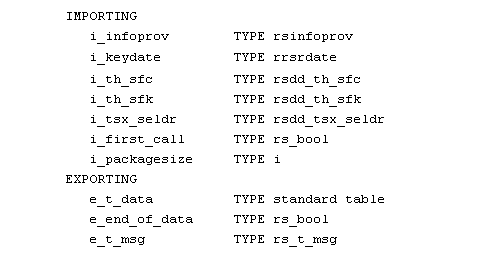
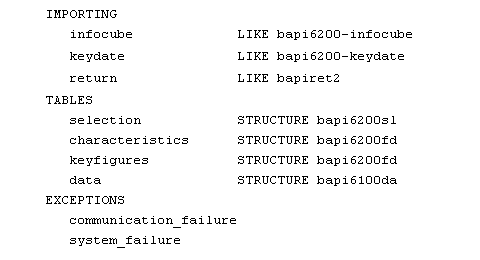
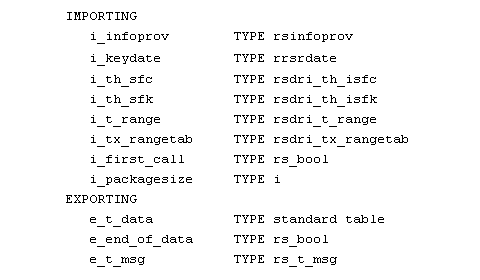
Different variants are allowed for the interface of the user-defined function module. These variants depend on the options you have chosen for the VirtualProvider:
● If Pack RFC is switched on, choose variant 1
● If SID Support is switched off, choose variant 2
● Otherwise, choose variant 3
Description of the Interfaces for User-Defined Function Modules
Variant 1:
Variant 2:
Variant 3:

Note that SAP may change the structures used in the interface.