
 Quotation Creation in the Portal
Use
In a utility company employing a dual contract model, you can use this business process to offer a commercial or industrial customer a quotation that you have created and calculated in the People-Centric UI (Key Account Manager Portal). The technical objects (connection objects, premises, points of delivery) and the consumption pattern of the customer at a corresponding point of delivery (load profile) serve as the basis for the quotation processing. You use this data to start a calculation process, such as with Microsoft Exceland to determine a record of prices, such as monthly price for on-peak and off-peak per point of delivery for the corresponding quotation period.
Prerequisites
You have conducted a sales negotiation with the commercial or industrial customer, and would now like to give the customer a quotation for further negotiations.
Process Flow
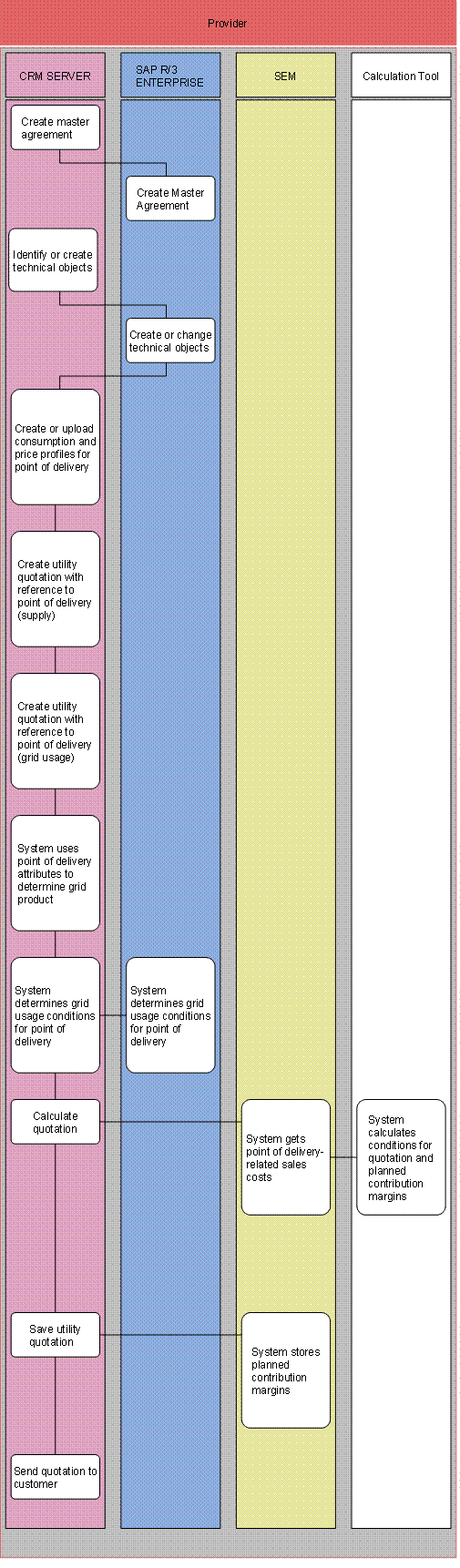
...
1.
Create master agreement (SAP CRM and SAP
R/3 Enterprise)
Optional: you use the Key Account Manager Portal in SAP CRM to create a master
agreement, which is replicated in SAP IS-U. Outline contracts are principally
used for chain and cluster customers, and define special conditions. If, for
example, the total consumption of 10 branches of a bakery is over 1,000,000
kWh per year, a discount of 3% is granted, which can be distributed between
the main business and the branches.
2.
Identify or create technical objects (SAP
CRM)
You use the Key Account Manager Portal in SAP CRM to identify the technical
objects, or create them there.
3.
System creates or changes technical
objects
The technical object data is replicated in SAP IS-U (SAP R/3
Enterprise).
4.
Create or upload load profiles for point
of delivery
You manually create load profiles for
the point of delivery for the customer, or import them from an external
file.
5.
Create utility quotation with reference
to point of delivery (supply)
You create a utility quotation item from the supply category, with reference
to the point of delivery.
6.
Create utility quotation with reference
to point of delivery (grid usage)
You create a utility quotation item from the grid usage category, with
reference to the point of delivery.
7.
System determines grid usage product,
using point of delivery attributes
SAP CRM uses point of delivery attributes to determine the grid usage
product.
8.
System determines grid usage conditions
for point of delivery (SAP CRM and SAP IS-U)
The system automatically determines the distributor and the corresponding grid usage
conditions for the corresponding point of delivery address. For this, the
CRM system directly accesses the data in SAP IS-U. Further parameters, such as
the voltage level, are also included here.
9.
Calculate quotation
You use the calculation tool (for example, Microsoft Excel) in the Key
Account Manager Portal to calculate the utility quotation.
10.
System evaluates conditions for quotation
and planned contribution margins
The conditions for the quotation and the planned contribution margin are
evaluated in SAP SEM. This
evaluation is integrated in the calculation tool.
11.
Save utility quotation
You save the utility quotation in SAP CRM.
12.
System stores planned contribution
margins
The planned contribution margins that were determined are automatically stored
in SAP SEM when you save the utility contract.
13.
Send quotation to customer
You send the utility quotation to the customer.
Result
Business partner data, business agreement data, outline contract and technical objects are saved in SAP CRM and replicated in SAP IS-U. The utility quotation is created in SAP CRM and the planned contribution margins are stored in SAP SEM. Based on the existing utility quotation, if the customer agrees, you can create a utility contract (see Utility Contract Processing in People-Centric UI (Dual Contract Model)).