
 Rule Resolution Using Organizational
Model
Rule Resolution Using Organizational
Model 
Purpose
You would use rule resolution using organizational model if you
· have created an organizational model or have distributed a plan into the CRM System and also want to use this for determining organizational data
· assign a lot of attributes to the organizational units and these are to be evaluated
Prerequisites
You have created or distributed a sales and service structure as an organizational model.
You have assigned attributes to the organizational units by completing the pre-defined attributes with values.
You have released the organizational units for this scenario that should be determined for documents in this scenario. For this set the Object Permitted for Scenario flag in attribute maintenance to Released.

To improve performance, we recommend that you release only the organizational units that are actually used in documents of particular scenarios, as only these are evaluated during automatic evaluation.
This also helps to avoid manifold determination results.
You have created a determination rule using the Organizational Model rule type, and, have assigned it to the required transaction type.
Process Flow
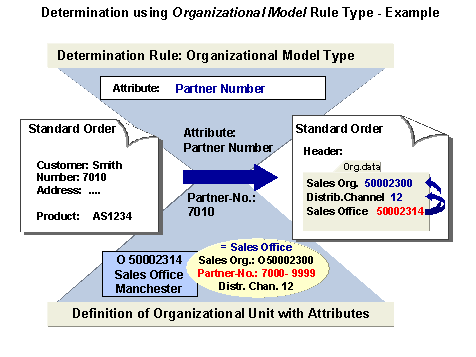
The following example shows the determination of organizational data using the Organizational Model rule type:
Default Settings
The organizational unit O 50002314 (Sales Office Manchester) contains, amongst other things, the attribute Partner Number with the values 7000 – 9999.
It has been released for the Sales scenario.
The determination rule for the sales order transaction type contains the Partner Number field.
Process Flow
...
1. You receive a sales order, for example, by telephone with the following details:
¡ Customer: 7010 Smith
¡ Product: AS1234 - Laptop AS
You create a sales order.
2. The system uses the determination rule, which has been assigned to the transaction type Sales Order in Customizing, to determine which attributes are to be evaluated.
3. The system finds the Partner Number attribute in the determination rule.
4. The system reads partner number 7010 from the order.
5. The system searches in the values in the organizational model to find which organizational attribute partner number 7010 has been assigned to and finds organizational unit Sales Office Manchester.
6. The system reads the other attributes assigned (or, passed on) to the organizational unit Sales Office Manchester and determines the data which is necessary to complete the organizational data of the document. In this case, Sales Organization 50002300 and Distribution Channel 12.
Result
The organizational data is in the document. If required, you can change this data manually.
Using organizational data (sales area), the system determines further data for the document, for example, involved partners, prices and terms of delivery.