
 User
Information System
User
Information System 
Use
You can use the User Information System to obtain an overview of the authorizations and users in your SAP System at any time using search criteria that you define. In particular, you can display lists of users to whom authorizations classified as critical are assigned. You can also use the User Information System to:
· Compare roles and users
· Display change documents for the authorization profile of a user
· Display the transactions contained in a role
· Create where-used lists

We recommend that you regularly check the various lists that are important for you. Define a monitoring procedure and corresponding checklists to ensure that you constantly check your authorization plan.
We also strongly recommend that you define the authorizations that are critical for you, and regularly check which users have these authorizations in their profiles.
To start the User Information System (transaction SUIM), either choose Tools ® Administration ® User Maintenance ® Information System in the SAP menu, or, in the user maintenance transaction (SU01), choose Information ® Information System.
Initial Screen of the User Information System
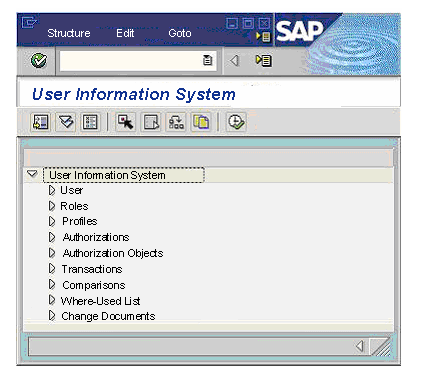
The possible evaluations are described in the following sections:
· Determining Users with the Users Node
· Determining Roles, Profiles, Authorizations, and Authorization Objects
· Comparing Cross-System Users, Authorizations, Roles, and Profiles
· Creating Where-Used Lists for Profiles
· Creating Where-Used Lists for Authorization Objects
· Creating Where-Used Lists for Authorizations
· Creating Where-Used Lists for Authorization Values
· Determining Change Documents