Report Structure
Definition
Screen area of the Report Designer.
Use
The report structure illustrates the report hierarchically, with all of its visible and hidden components. As in the design area, there is also a context menu for you to work with for the report structure. In contrast to the design area, in which objects such as group levels cannot be selected, these types of objects can be selected and edited in the report structure.
Structure
Depending on the structure of a report, the following elements can be displayed hierarchically.
● Page header and / or footer
Static section with the associated row patterns and their cells, which can also contain various fields such as free text or query fields.
● Report section without data connection
Static section with the associated row patterns and their cells, which can also contain various fields such as free text or query fields.
● Report section with data connection
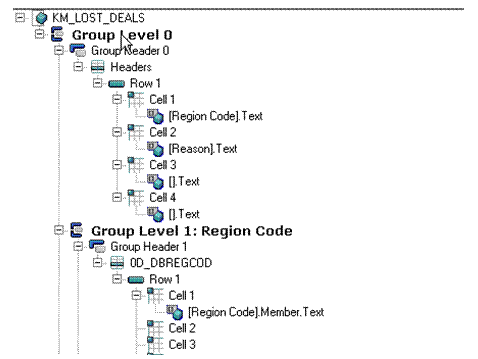
Here the static and dynamic report sections are displayed with a hierarchical structure. The name of the data provider with the associated row patterns is displayed for every group level (only for dynamic reports), along with the individual elements: every group level is listed in its structure with the associated header, detail and footer areas. Each area of a group level is displayed with the associated rows and their cells, which can also contain query fields and free text.
The following graphic illustrates a section of the report structure of a report with a dynamic report section that is connected with data.