
 Kit for the Order
Purpose
You can use this process to make the system automatically assemble kits for the order when there is not a kit in stock.
The following rules apply to kits:
· A kit is always delivered to the customer in its entirety
· Kit header and kit components are always scheduled to the same date
· All parts of a kit have to come from the same storage location (this can also be achieved by internal stock transfer between the storage locations)
· Prices for kits are always calculated at kit header level
· Kit header and kit component have a quantity relationship that is defined by the kit structure, and must be recalculated as soon as quantity-related changes are made at kit header level or kit component level.
If the kit is in stock, the SPM Goods Issue Process is started.
For more information on the SPM Goods Issue Process, see the SAP Library for SAP ECC under Logistics ® Logistics - General (LO) ® SAP Service Parts Management (LO-SPM) ® Goods Issue Process.
Prerequisites
You use the following systems:
· SAP CRM 5.0
For more information, see Additional ATP Functions in Service Parts Management.
· SAP ECC 6.0
For more information on the required Customizing settings, see the SAP Library for SAP ECC under Logistics ® Logistics - General (LO) ® SAP Service Parts Management (LO-SPM) ® Goods Issue Process ® Customizing Settings.
· SAP SCM 5.0
¡ EWM
¡ APO
For more information, see the SAP Library for SAP SCM under SAP Advanced Planning and Optimization (SAP APO) ® Global Available-to-Promise (Global ATP) ® Advanced Availability Check Methods ® Comparison of Multilevel ATP Check and Capable-to-Promise (CTP) ® Availability Check for Kits.
Process Flow
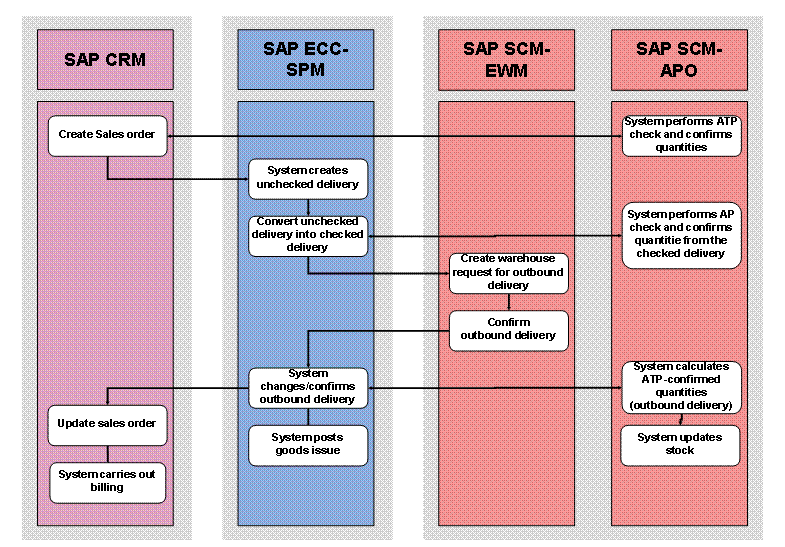
...
1. Create sales order (SAP CRM)
Create a sales order.
¡ The system triggers the rules-based availability check in SAP SCM for a requirement from the sales order. The system determines one or more rules with product substitutions. One of the product substitutions is a kit.
¡ A requirement for a kit as an input product results from the sales order. Accordingly, the system triggers the ATP check in SAP SCM.
a. The system initiates the credit check in SAP ECC.
b. The system carries out pricing and checks for the sales order, and checks for foreign trade regulations.
c. The system transfers the data from the sales order to SAP ECC.
For further
information on maintaining sales orders, see  Sales
Order
Sales
Order
2. System performs ATP check and confirms quantities (SAP SCM-APO)
The system checks whether the kit is in stock. If the kit is not in stock, the production that is activated in the check instructions generates a kit structure that contains the kit components that the system needs to assemble the kit. The system then performs the availability check for the kit components and confirms the quantities for the sales order.
3. System creates unchecked delivery (SAP ECC-SPM)
The system creates an unchecked delivery without generating an SD order.
For more information, see the SAP Library for SAP ECC under Logistics ® Logistics - General (LO) ® SAP Service Parts Management (LO-SPM) ® Goods Issue Process ® Creating and Updating Unchecked Deliveries.
4. Convert unchecked deliveries into checked deliveries (SAP ECC-SPM)
You use transaction VL10UC to convert the unchecked delivery into a checked delivery.
For more information, see the SAP Library for SAP ECC under Logistics ® Logistics - General (LO) ® SAP Service Parts Management (LO-SPM) ® Goods Issue Process ® Converting Unchecked Deliveries into Checked Deliveries.
5. System performs ATP check and confirms quantities from the checked delivery (SAP SCM-APO)
The system performs a new availability check for the individual kit components for the outbound delivery.
For more information, see the SAP Library for SAP SCM under SAP Advanced Planning and Optimization (SAP APO) ® Global Available-to-Promise (Global ATP) ® Advanced Availability Check Methods ® Comparison of Multilevel ATP Check and Capable-to-Promise (CTP) ® Availability Check for Kits.
6. Create warehouse request for outbound delivery (SAP SCM-EWM)
You enter a warehouse request for the outbound delivery in EWM.
7. Confirm outbound delivery (SAP SCM-EWM)
You confirm the outbound delivery.
8. System changes/confirms the outbound delivery (SAP ECC-SPM)
¡ If quantity shortages are verified by EWM, the system changes the delivery and then confirms it.
¡ If EWM verifies exact delivery fulfillment, the system confirms the delivery straight away.
For more information, see the SAP Library for SAP ECC under Logistics ® Logistics - General (LO) ® SAP Service Parts Management (LO-SPM) ® Goods Issue Process ® Processing Checked Deliveries.
9. System posts goods issue (SAP ECC-SPM)
The system makes the goods issue posting for kits.
For more information on goods issue posting for kits, see the SAP Library for SAP ECC under Logistics ® Logistics - General (LO) ® SAP Service Parts Management (LO-SPM) ® Goods Issue Process ® Transfer Posting for Kits.
10. System calculates ATP-confirmed quantities (outbound delivery) (SAP SCM-APO)
11. System updates stock (SAP SCM-APO)
12. System updates sales order (SAP CRM)
The system updates the date in the sales order.
For more
information on maintaining sales orders, see Sales
Order
13. System carries out billing (SAP CRM)
The system carries out billing.