
 Structure Gap Management in Installed Base
Management
Structure Gap Management in Installed Base
Management 
Use
You can have structure gaps within an installed base with the component type Product structure gaps or Ind. object structure gaps. These structure gaps are used as placeholders and have their own symbol. This makes it possible to remove an individual component without losing the substructures that are linked with this component.
From a technical viewpoint, structure gaps are components of type Product or individual object whose corresponding reference to one of these objects is indicated as not valid.
Features
Structure gaps can occur as follows:
· Initial, that is, by specifying the component type when you create it.
No reference data is available when you create a structure gap in this way. This means that:
¡ For a structure gap of type Ind.object structure gap, no object ID and no object family is assigned, nor can they be entered.
¡ For a structure gap of type Product structure gap, a product ID is not assigned and cannot be entered.
You can enter reference data using the insert process.
· Removal, that is, the component is identified as a structure gap while retaining the existing reference by replacing the symbol. The component type-specific input fields can no longer be edited.
The corresponding reference is no longer valid; the reference data is still displayed, however. It can be replaced later on by a different or the same reference. As a result, it is possible to identify individual objects as being removed from a hierarchy without losing the information that is assigned to the component (such as counters, partners, address, qualifications and warranties) as well as the structure of the whole hierarchy. Once it has been removed, a component of type individual object could be assigned to a different installed base hierarchy.
The reference data is displayed in the fields that are not ready for input. If this data is no longer available, for example because the object is archived, then the corresponding fields are empty as in the case of the initial structure gaps. Furthermore, references that are not available do not create any error messages, as in this case the reference data is not validated.

You can also permanently delete components. In this case, cut the component and do not reinsert it in a different position. This restricts the validity of a component, that is, when you consider an installed base at the time before a component was removed (in the past), all component information is available at this point in time.
The components of the two types Product and Individual object behave differently if you remove them from the structure. The following table shows the differences:
Component type |
Product |
Individual Objects |
1. Before the component is removed
|
|
|
A component of type Product contains subcomponents. |
A component of type Individual object contains subcomponents. |
|
2. After the component is removed |
|
|
The component itself becomes a structure gap, its subcomponents remain. |
The component itself becomes a structure gap, its subcomponents remain. |
|
3. After a component is inserted |
|
|
Once a different product has been inserted (only a product is possible, as no component type change is supported), its subcomponents remain. |
Once a different individual object has been inserted (only an individual objects is possible, as no component type change is supported), its subcomponents remain. |
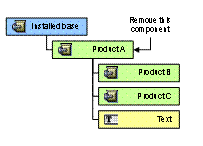
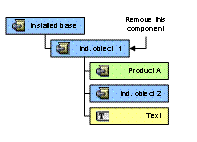
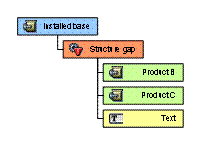
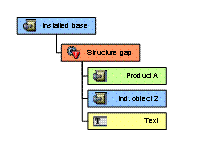
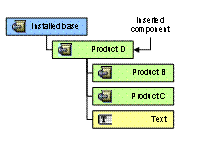
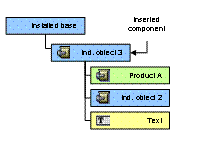
The installed base category Object structure behaves differently regarding the insertion and removal of individual objects.
For more information, see  Managing
Structure Gaps.
Managing
Structure Gaps.
Activities
Removing Components
· In the installed base, select the component that you want to remove.
· Choose Remove.
The component is identified as a structure gap while retaining the reference.
· Save your changes.
Inserting Components
· In the installed base, select the structure gap where you want to insert a reference to a product or individual object.
· Choose Insert.
· You enter the component-specific information.
· Save your changes.