
 Service
Agreement
Service
Agreement 
Definition
A long-term outline agreement between business partners in which conditions, such as prices, and releasable products are defined. These conditions and products are valid for all service contracts or service orders that are created with reference to the service agreement.
Unlike service contracts (value/quantity), service agreements contain no target values or quantities.

You cannot exchange service agreements with the enterprise resource planning (ERP) system.
Use
Service agreements make it possible for service providers to create long-term outline agreements with information about prices and services that are valid for certain business partners or a certain group of business partners.
Service agreements may include predefined data about the following:
● Services
● Service Level Agreements
● Follow-up activities
● Price agreements
● Billing
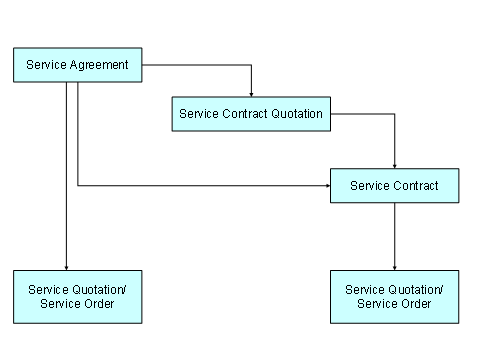
Service providers can create follow-up documents such as those below with reference to service agreements:
● Service quotation
● Service order
● Service contract quotation
● Service contract
Integration
Customizing
The OAS (Service Agreement) transaction type is available for service agreements in standard Customizing for transactions. This transaction type has the leading transaction category Group Contract (BUS2000107).
The new item category OASP (Service Agreement Item) was created with item object type Outline Agreement Item Service CRM.
You can either use this transaction type and item category as they are, or copy them and change them to meet your needs.
The following settings are relevant for defining service agreements:
● Agreement determination
If you want the system to find valid service agreements when service orders, complaints, or confirmations are created, in Customizing for transaction types, activate the indicator for agreement determination.
In Customizing for Customer Relationship Management (CRM), choose Transactions ® Basic Settings ® Define Transaction Types, and go to the detailed display of the desired transaction type. In the Agreement Determination field, select the determination type that you want the system to use.
● If the system should search for contracts as well as agreements, the system first searches for valid service contracts. Only if it finds no service contracts does it search for service agreements. Service contracts take priority over service agreements.
● Copying control
You must set the copying control for the transaction type of the desired follow-up document, such as service order. In the standard system, copying control for service agreements is available for:
○ Service contracts (SC)
○ Service contract quotations (SCQ)
○ Service orders (SRVO)
○ Service quotations (SRVQ)
○ Usage-based service contracts (USC)
○ Usage-based service order quotations (USCA)
In Customizing for SAP CRM, choose Transactions ® Basic Settings ® Copying Control for Business Transactions ® Define Copying Control for Transaction Types.
● Price agreements
The CONT002 (Date Profile for Service Contracts) date profile exists in standard Customizing for processing service agreements.
Business partners
In the business partner master, you can assign one default service agreement to a business partner. To do so, in the business partner role Sold-To Party, call up the business partner and the different sales area data.
The service agreements and sales agreements that exist for this business partner in the system appear on the Sales tab page, on the Sales Agreement section of the screen. You can also set one sales agreement or service agreement as the default.
The default setting is no service agreement.
Business partner type
You can create a service agreement for a business partner type, without specifying an explicit sold-to party. This means that the agreement is valid for all business partners who are assigned to the corresponding partner type, and for whom the corresponding sales area data was processed.
These documents are also considered during agreement determination.
Service orders
If a service order is created with reference to a service contract, which in turn is a follow-up document of a service agreement, the service order is only checked against the service contract, but not against the service agreement.