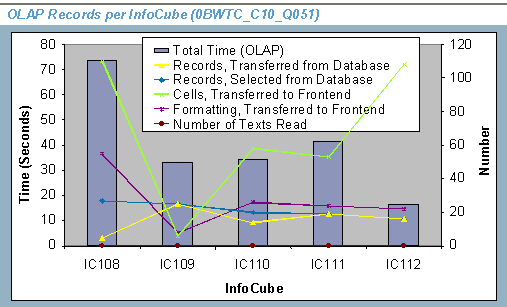
Chart: OLAP Records per InfoCube
Technical name: 0BWTC_C10_Q051
Based on InfoCube: BW statistics MultiProvider (0BWTC_C10)
Use
The Chart: OLAP Records per InfoCube gives an overview of the use and performance of the Business Information Warehouse (OLAP), itemized according to InfoCubes.
This graphic representation offers you a quick overview with regard to the following questions:
Which InfoCubes are frequently used?
The Total Time (OLAP) key figure is represented for each of the examined InfoCubes in the form of a bar. The height of the bars represents the total query runtime. The y axis on the left-hand side shows the value scale for the time in seconds.
How many data records were there per InfoCube?
The key figures containing the remaining data records (OLAP) (0BWTC_C10_S051) in the structure – except for the total time (OLAP) just mentioned – are each represented by a line in the diagram:
· Records selected from the database (0TCTNDBSEL)
· Records transferred from the database to the application server (0TCTNDBTRA)
· Cells transferred to the frontend (0TCTNCELLS)
· Formatting transferred to the frontend (0TCTNRANGS)
· Number of read texts (0TCTCHAVRD)
The data record lines come from the combination of values that produce the key figures for each of the examined InfoCubes. The y axis on the right-hand side shows the value scale for the number of records.
From the variance between the values you can see, for each InfoCube, the extent to which the number of selected records from the database compares to the records transferred from the database, and to the records displayed in the frontend.
Ideally, the lines “records selected from the database” and “records transferred from the database” should have about the same gradient. If clearly fewer records were transferred to the OLAP processor than were selected from the database, use BW statistics to examine this with regard to the following questions:
· Which query or queries cause this?
· Can they be defined again and do they need to be?

You can find additional information about the number of data records at OLAP Use per InfoCube (Records) (0BWTC_C10_Q501).
Filters
|
InfoObject |
Description of the InfoObject (Restriction or Calculation Formula) |
|
0TCTQUERY |
restricted to characteristic variable query 0TCTQUYS |
|
0TCTUSERNM |
restricted to characteristic variable user 0TCTUSES |
|
0TCTOLAPACT |
restricted to the following fixed values: = ODBO (5) = Print in Batch (2) = Execute Query/ Navigation Step (1) |
|
0CALDAY |
|
|
0TCTOBJVERS |
restricted to fixed value = A |
 Query
QueryFree Characteristics
|
InfoObject |
Description |
|
0TCTSYSID |
Variables Used
|
Variable |
Description |
|
0TCTQUYS |
Query |
|
0TCTUSES |
User |
|
0TCTCUBS |
InfoCube |
Rows
|
InfoObject |
Description of the InfoObject (Restriction or Calculation Formula) |
|
0TCTIFCUBE |
restricted to characteristic variable InfoCube 0TCTCUBS |
Columns
|
InfoObject |
Description of the InfoObject (Restriction or Calculation Formula) |
|
0BWTC_C10_S051 |
Example