
 Segmentation
Purpose
You use this business process to separate your customer base into different segments, thus enabling you to contact the resulting target groups more effectively in your marketing campaigns. To communicate with your customers in a targeted way, you must know who your customers are, and you must have information on their interests and purchasing behavior. The existing marketing data on your business partners therefore makes a valuable contribution when modeling target groups for your marketing activities.
The customer segmentation depends on the planned marketing activity. You create target groups from a variety of different data sources by combining selection criteria obtained from InfoSet queries, BI queries, and business partner master data. Target groups may be attached directly to marketing campaigns or used as additional criteria for product proposals. From the CRM Marketing Planner, the business partners in the target groups can be contacted by a variety of channels including SMS, e-mail, and telephone. You also have the option of contacting target groups directly without reference to a campaign.
Process Flow
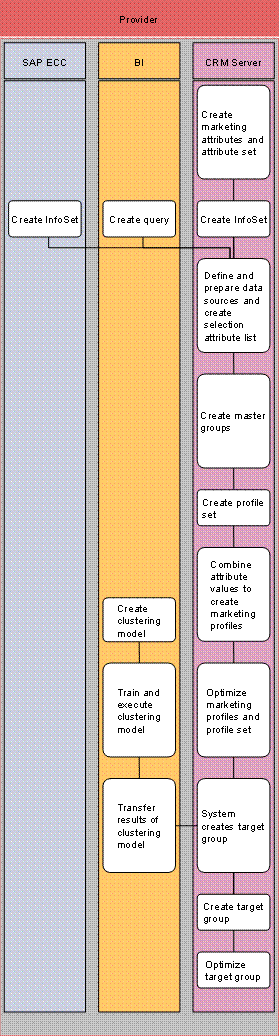
...
1. Create marketing attributes (CRM server)
In addition to the attributes for your business partners and individual objects derived from master data and transaction data, you can also define additional attributes in CRM that describe your business partners (for example hobbies).
2. Create InfoSet (SAP ECC/CRM server)
In SAP CRM, you draw together business partner data from multiple sources, be it from a CRM, BI, or ERP System. You only need to create InfoSets in SAP ECC if you later want to select business partner master data in the Segment Builder that has been saved in SAP ECC system but not in the CRM system.
3. Create a query (BI)
You only need to carry out this step if you want to choose from key figures or attributes in the BI system. BI queries enable you to enhance your segmentations with transaction data.
4. Define and prepare data sources (CRM server)
Data sources can contain data from attribute sets, BI queries, and InfoSet queries.
5. Create master group (CRM server)
You create one or more master groups as a form of data pre-selection. Various standard programs are provided for this task. These can be supplemented according to requirements. Master groups can also be created as target groups in the Segment Builder. They are transferred to the BI system.
6. Create profile set (CRM server)
You create a profile set. The profile set can include several profiles, target groups, as well as additional profile sets.
7. Combine attribute values to create marketing profiles (CRM server)
Using the attributes and attribute values created previously and combined in attribute lists, you can combine the required selection criteria into marketing profiles to determine precisely the business partners to which your marketing activity needs to be tailored. If necessary, you can add additional personalized attribute values to an attribute list at this point.
8. Optimize marketing profiles and profile set (CRM server)
You can use the RFM analysis to optimize your profiles so that the target group only contains business partners who are highly likely to respond to a campaign.
By defining an upper size limit for your target group size, you can reduce your marketing segments to the correct size with the aid of size reduction rules.
9. Create clustering model (BI)
You create a clustering model with the relevant dimensions and weighting. The dimensions are the input criteria for the clustering. On a technical level, they are the model fields of a clustering model. If you do not know which dimensions need to be considered in clustering, you can use the data mining method Decision Tree to determine the most important dimensions from a larger amount of possible dimensions and then apply them in clustering.
10. Train and execute clustering model (BI)
While training the model, the system determines the customer segments in the BI system. To train the model, you use a BI query that provides the data on your customers that is collected in the customer knowledge base. The system groups together all customers according to their common properties and creates clusters and thereby customer segments. Each customer is assigned to precisely one customer segment.
11. Transfer results of clustering model (BI)
There are several methods of transferring the clustering results from the BI system to the CRM system. You can use the analysis process designer to transfer the updated master data attribute in the BI system to a marketing attribute.
12. The system creates a target group (CRM server)
13. Create target group (CRM server)
You can generate a target group from the profile. The system then checks the selection criteria contained in the profile against the customer database.
14. Optimize target group (CRM server)
You can further adjust the target group you created by using additional criteria and the functions Merge, Remove, or Intersect. You can also reduce the target group to a specific size, split it into several target groups, or compare it with other target groups. You can also perform deduplication for a single target group or all target groups of a profile set to ensure that individual business partners are not contacted more than once.