 Example 4: Rules-Based ATP Check - Unconfirmed Quantities II

Example 4: Rules-Based ATP Check - Unconfirmed Quantities II

For the sake of simplicity, the copied confirmation schedule lines in the higher-level item are not displayed here (see
Example 2).As in
Example 3, only 6 pc of the requested product and 2 pc of the substitute product (8 pc in total) could be confirmed. There is a remaining requirement of 2 pc, for which a request schedule line is automatically created in the sales order with a confirmed quantity of zero. This requirement of 2 pc is saved as a requirement in SAP APO and will be taken into consideration for planning.At a later stage, you can carry out availability check for the sales order again (manually or with backorder processing), to have the remaining 2 pc confirmed.
We recommend that you set up Customizing in SAP APO so that unconfirmed quantities are saved as requirements.
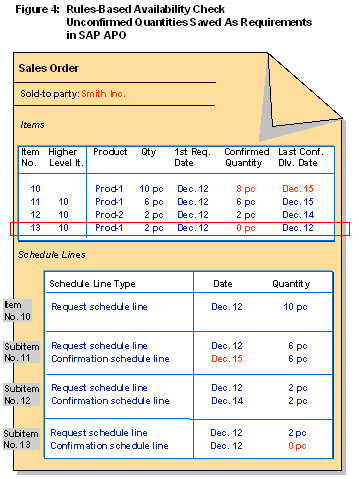
In the example above, the unconfirmed quantity (which is saved in SAP APO as a requirement) is for the requested product.
You can control whether the unconfirmed quantity should be for the product and location
For more information, see the Implementation Guide (IMG) in the SAP APO System under SAP Advanced Planner and Optimizer (SAP APO) ® Global Available-to-Promise (Global ATP Check) ® General Settings ® Maintain Check Instructions.