
 Repaying Payments on Account
Use
This business process allows you to repay an invoicing service provider’s payments if they could not be allocated.
Prerequisites
You have posted an incoming payment from a market partner to the invoicing service provider and distributed the payment to end customer level using a distribution lot. End customer accounts now contain payments on account that you cannot allocate. The payments must be reimbursed to the market partner.
Process Flow
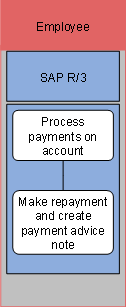
The following process runs in SAP R/3:
...
1. Process payments on account
In this step, you select the payments on account at end customer level that are to be reimbursed. The selected payments are aggregated and posted to the invoicing service provider’s account. They are assigned a repayment method.
2. Make repayment and create payment advice note
In this step, you execute a payment run in Contract Accounts Receivable and Payable (FI-CA). The items with a repayment method in the invoicing service provider’s account are selected and cleared. A payment advice note is then created containing information on the individual payments on account at end customer level.
Result
You have used a distribution lot to clear payments on account at end customer level. A document containing the items relevant for repayment were generated in the invoicing service provider’s account. These items were reimbursed to the invoicing service provider.
In a subsequent step, the invoicing service provider can use the created payment advice note to allocate a payment.