Additional Input/Output Files

Additional Input/Output Files
Use
For fields with binary data (field type R) and for long character fields (field type M), additional input/output files are required for the ASCII Adapter to be able to process such fields. For fields with binary data (field type R) and for long character fields (field type M), additional input/output files are required for the ASCII Adapter to be able to process such fields. The data contained in such a field is then stored into this additional file by the ASCII Adapter.

In R/3, there is only one LONG column allowed per table.
Name and Structure
The name and structure of such additional files is as follows:
<DBFNAME>_<FIELDNAME>.DAT
<DBFNAME> corresponds to the value of DBFNAME in table
SMO7ASCAD.<FIELDNAME> corresponds to the value of FIELDNAME in table
SMO7ASCSTR.For field type R or M, FIELDLEN in table SMO7ASCSTR should be set to 10 in the case of a fixed record length.
In the ASCII file itself, the numeric offset (not more than 10 digits) is used in such cases. It specifies where the data can be found in the additional file. The offset is zero-based, counted from the beginning of the file.
The first four bytes of the additional file contain the length of the data portion for the current row (binary value in Intel format).
Example
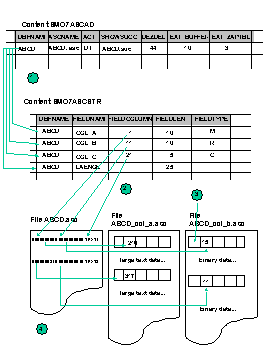
The example shows an export definition for the table ABCD that is converted into an ASCII file ABCD.asc. The table contains 3 columns, one column with comprehensive text data and one column with binary data.
Both columns are exported to the export files ABCD_col_a.asc and ABCD_col_B.asc. The ASCII files should be created with a fixed column length. Set "," as decimal delimiter. Before starting the processing the target files are emptied. After processing the source file is as well emptied. In the example only the relevant columns of the control tables SMO7ASCAD and SMO7ASCSTR are shown.