
 Revenue Recognition for Service
Contracts with SAP ECC Integration
Revenue Recognition for Service
Contracts with SAP ECC Integration 
Use
Many companies require period-based accrual calculation of revenues. This means that revenue must be realized in the posting period in which the service was rendered rather than in the posting period in which the billing document was created. You can use the revenue recognition function to fulfill this requirement by separating revenue recognition from the billing process.
The automatic transfer of data from business processes in SAP Customer Relationship Management (SAP CRM) Service into an SAP ECC internal order makes it possible for you to use results analysis in SAP ERP Central Component (SAP ECC).

Revenue recognition in SAP CRM is used in service contracts in SAP CRM and technically has nothing to do with the revenue recognition in the SAP ECC sales and distribution component (SD). Technically, results analysis in SAP ECC component CO-PC is used.
Revenue recognition controls how much revenue is to be reported in which posting period.
Revenue recognition allows you to post revenue to the financial accounting components in SAP ECC independent of billing documents, which are posted to revenue accounts. In this way, revenues can be posted before, during, or after the actual billing.
Revenues can be realized on a periodic basis or on the basis of individual events:
● Standard revenue realization means that billing documents are posted directly to a revenue account. This type of posting occurs without a revenue recognition process.
● Time-based (periodic) revenue recognition means that the revenue of a sale is distributed and posted evenly over the entire contract term. For this process, the billing document is posted to an accruals account first and the revenues are transferred to the revenue accounts in a second step.
● Service-related revenue recognition (value/quantity contract with target quantity) means that the revenue is realized according to an event. The event is a contract release order that is reflected as a service order or a service confirmation. Once again, the billing document is posted to an accruals account first and the revenues are transferred to the revenue accounts in a second step.
Integration
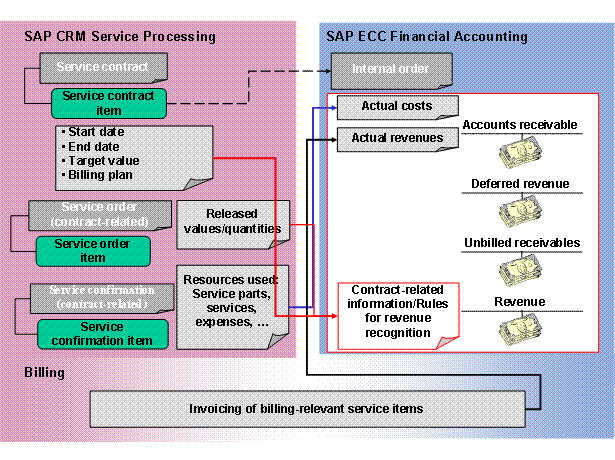
Revenue recognition involves various components:
● SAP CRM for creating the service contract, service order, and service confirmation
● SAP ECC financial accounting (FI) for posting to general ledger accounts
The data flow between the two systems is illustrated as follows:
Prerequisite
You have completed Customizing for Revenue Recognition with SAP ECC Integration.
Features
Service-Related Revenue Recognition (Value Contract)
The following values are determined in SAP CRM and transferred to SAP ECC:
● Target value from the service contract items
● Contract start date and contract end date
● Release values from service orders
The following values are calculated in SAP ECC:
● Accrual quantity per posting period in percent (degree of revenue recognition) = Release value per posting period / target value * 100
● Realized revenue per period = Accrual quantity per posting period in percent * Planned revenue
The planned revenue is equal to the target value.

Time-Based Revenue Recognition
The following values are determined in SAP CRM and transferred to SAP ECC:
● Contract start date and contract end date
● Sum of billing request items
The following values are calculated in SAP ECC:
● Accrual quantity per posting period in percent (degree of revenue recognition) = 100 / Number of posting periods
● Realized revenue per period = Accrual quantity per posting period in percent * Planned revenue
The planned revenue is equal to the sum of the billing request items.

Activities
SAP CRM automatically transfers the necessary data to SAP ECC.