
 Dataflow 3.x Example: JDBC Source with
Transaction Data
Dataflow 3.x Example: JDBC Source with
Transaction Data 
In the following
example, we are assuming that the prerequisites for the use of an  SAP RemoteCube are
fulfilled. In this way, you can define a query with direct access to the
transaction data in the UD Connect source. The data is not physically stored
in BI.
SAP RemoteCube are
fulfilled. In this way, you can define a query with direct access to the
transaction data in the UD Connect source. The data is not physically stored
in BI.
A database management system (DBMS) with tables is used as the UD Connect source and views are used as the UD Connect source objects. In order to be able to use this source you have to install the appropriate JDBC driver for your DBMS provider on the J2EE Engine of the SAP Web AS. After that you can configure the BI JDBC Connector, that is, the connection between the J2EE Engine and the DBMS. In BI, you create an InfoSource with flexible update based on InfoObjects that are compatible with the view or table fields of the DBMS. For this InfoSource, you generate a generic DataSource for access to data in the DBMS. Select a table or a view for the DBMS and assign the fields to the DataSource fields. You use an SAP RemoteCube (that you have generated from the InfoSource) to define a query in BI. You can use the data in the table or view for immediate analysis; you do not have to load it into BI. You can use all the analysis tools of the Business Explorer (query in BEx Analyzer or Web application), or you can run an analysis in the portal.
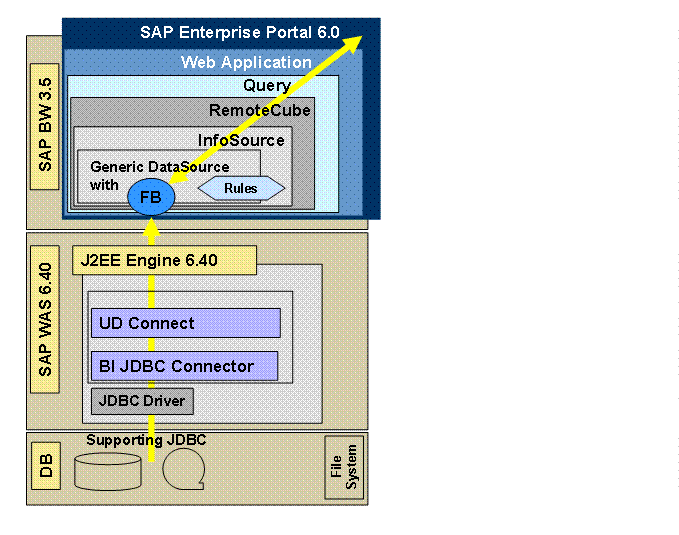
Inversion of transfer rules with direct access via SAP RemoteCube
If you have established transfer rules, they will be inverted at the value selection in a query. When accessing data in the data source (in your case, table or view), the system reverses the order of the transfer rules.
For example, if you select the period 1.2002 until 5.2002 (characteristic 0FISCPER), and the DataSource contains this information in two fields for year and period (the fields year and period are mapped with transfer rules on 0FISCPER), BI inverts the transfer rules and divides the selection into year 2002 and period 1,...,5. This selection is passed on to the table or the view and then sent on to BI. In BI, year and period are combined again into 0FISCPER in the transfer rules and the data is displayed according to the selection in the query.