
 Activity Analysis
Purpose
You can use this business process to evaluate business activities in detail. Activity Analysis enables sales managers to monitor the their sales team’s daily work, as well as enabling sales representatives to keep track of their own activities. You can see the success rate of activities, analyze whether customer contact was predominantly initiated by the customer or your sales team, or evaluate the intensity of your customer care. It is also possible to analyze activities in conjunction with their associated products so that you can gain an accurate picture of whether your sales strategy is being implemented and how successful it is.
Process Flow
The diagram below illustrates the Activity Analysis process:
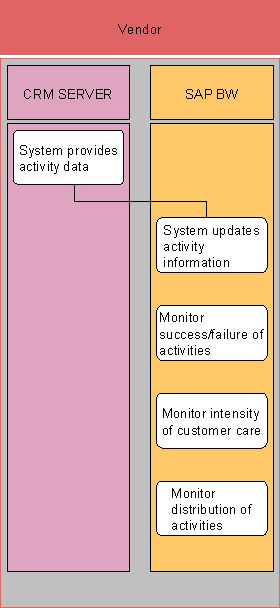
1. System provides activity data.
The SAP CRM system provides activity data to SAP BW.
2. System updates activity information.
The SAP BW system updates its activity information.
3. Monitor success/failure of activities.
You monitor the success/failure rate of activities by using the Success/Failure Analysis (query 0CSAL_C01_Q0006).
4. Monitor intensity of customer care.
You monitor the intensity of your customer care, in other words, how much time is spent with customers. To do this, you use the Intensity of Customer Care query (query 0CSAL_C01_Q0003).
5. Monitor distribution of activities.
You monitor
the distribution of activities across organizational units in order to help
predict the future workload. To do this, you use the Distribution of
Activities per Organizational Unit query (query 0CSAL_C01_Q0005).