
 Inbound Processing and Receipt Confirmation
with WM
Inbound Processing and Receipt Confirmation
with WM 
Purpose
You can use this business process for your inbound processing and receipt confirmation in conjunction with Warehouse Management (WM). Whenever a company requires a product to be procured from an external source of supply, whether for use in production (raw materials) or for direct consumption (C-materials), the product will be delivered according to the official procurement document (a PO) agreed between two business partners. The arrival of the goods could be announced by a message of the supplier (ASN). It will be delivered in a certain quantity at a defined date and time at a defined company location. For the delivered product an inbound delivery is selected and processed for putaway. Once the goods are taken into stock, a goods receipt must be posted.
The actual physical receipt of materials at the warehouse or the receiving locations can be controlled on different levels of detail. From controlling the process on a document level only using purchase orders and stock transports orders to inbound deliveries and shipments and even to the pallet and material level, the receiving process is supported in different ways. Depending on specific customer needs, it is optional to use inbound deliveries and advanced material flow and process control capabilities.
Inbound processing and goods receipts are key steps in any procurement or replenishment process. It is not industry-specific, but common practice for any company procuring products, whether for production of its own or direct consumption.
Inbound processing reflects the receipt of materials that are delivered to a receiving location. This receipt can be processed based on purchase orders, stock transport orders, or even a returns order. It includes the notification of goods to be received, the putaway, goods receipt posting, and the proof-of-delivery message to the supplier. By viewing the goods receipt from two perspectives, it is possible to follow the purchase order process and the physical material movements separately.
The processes described are good receipt against a purchase order (MIGO) using Warehouse Management and inbound processing using the inbound delivery, the ASN message and the POD of the customer. The good receipt posting can be processed prior to or after putaway of the materials. Both possibilities are described as alternatives in the business process procedure:
· Goods Receipt for Purchase Order
· Goods Receipt Posting for Inbound Delivery after Putaway
If Handling Unit Management is used for packing, you must use in inbound delivery to pack against. An inbound delivery is also required if the warehouse is implemented in a decentralized environment (BAPI connection between Warehouse Management and the ERP System).
Process Flow
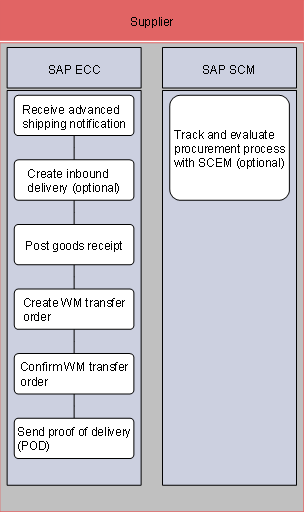
...
1. Receive advanced shipping notification (ASN) (SAP ECC)
The arrival of goods procured and received is announced by a message of the supplier to the goods recipient. This message is called Advanced Shipping Notification (ASN) and it contains logistically relevant data, such as date and time of delivery, material, quantities, and packing information. The ASN is typically sent by the shipper of the goods. This can be the supplier (external or internal) or a third-party logistics service provider (3PL). The message is received by the ship-to-party and mapped into an inbound delivery in the SAP R/3 system.
Alternatively, an inbound delivery can be created by the receiving party to reflect the planning and coordination of the inbound delivery processing.
2. Create inbound delivery (optional) (SAP ECC)
When the actual shipment arrives, the inbound delivery is selected and processed for putaway. The putaway can be processed with or without Warehouse Management (see process Inbound Processing and Receipt Confirmation).
3. Post goods receipt (SAP ECC)
When a required product is delivered to a company from an external source of supply according to a purchase order, it must be integrated into the company’s stock and a goods receipt must be posted.
With this process description, you can also execute a goods receipt with reference to a production order.
When a goods receipt is effected, the system supports:
¡ Message determination
Depending on the settings in Customizing, the system initiates the printing of a material document and labels, for example for pallets or packages.
¡ Missing parts check
For example, if a given product is identified as a missing part in production, the MRP controller is automatically informed by mail that a goods receipt for this critical product has been posted.
¡ Purchase order history
The system updates the purchase order history, so that the purchasing department can monitor that the goods receipt to the PO has been posted and may check delivery date, time, and quantity. This information may also be relevant for Vendor Evaluation.
¡ Final delivery indicator
If information about final delivery is desired, the system sets the final delivery indicator to inform the purchasing department that the last partial delivery has been effected.
¡ Material valuation
A goods receipt posting triggers an update of stock balance and stock value. After a goods receipt, the system creates a material document serving as proof of the goods movement and an accounting document to initiate the update of the relevant G/L accounts. From goods receipt you can display the material document and from there the accounting document. When the product is valuated with moving average price, the material price is updated according to the price in the most recent PO.
¡ SAP APO update
If you work with SAP APO, the new SAP R/3 stock balance data updates the SAP APO stocks, relevant for planning.
¡ SAP BW update
If you work with SAP Business Warehouse, new SAP R/3 stock balance data updates user-defined figures in SAP BW, relevant for reporting.
Depending on special procurement processes (identified by specific PO item categories), the consequences of posting a goods receipt are the following:
¡ Consignment
The goods receipt is posted, but material valuation is not affected, because the supplier still is the material owner.
¡ Subcontracting
The goods receipt is posted and effects the withdrawal of material components from special stock, necessary for the subcontractor to assemble the final product.
For this business process, we will assume that all steps are carried out manually. Many of these steps can be processed in the background for more efficient processing, but it is important to understand which steps are required within the entire process before you can automate it. The Goods Receipt Posting can be processed before or after putaway of the materials.
Following the Goods Receipt posting for an external purchase order, materials are located in the warehouse in an interim storage type of 902.

If
Cross-Docking functionality is desired, see  Cross
Docking.
Cross
Docking.
For further
information on Warehouse Management, see Warehousing and
Storage.
4. Create WM transfer order (SAP ECC)
The transfer order is required to move the materials to their final storage destination. It consists of items that contain the quantity of the material to move and specifies the source and destination storage bins. The transfer order logic finds an appropriate bin for storage based on configuration settings in the warehouse customizing. The transfer order will list the source (902) location as well as the destination location for the materials.
5. Confirm WM transfer order (SAP ECC)
The transfer order must be confirmed for inbound delivery items using the Warehouse Management System (WMS). Upon confirmation of the transfer order, the materials are available at their final destination. If the placement logic is used, it searches for the Next Empty Bin, progressing through the storage type search sequence as configured to find the next available place appropriate to store this material.
6. Send proof of delivery (POD) (SAP ECC)
To report the actual received quantities, times, and dates of delivery back to the supplier for invoicing, the message Proof-of-Delivery (POD) is sent.
7. Track and evaluate procurement process with SCEM (optional) (SAP SCM)
Optionally, the process Inbound Processing/Receipt Confirmation can be monitored with the help of SAP EM. Since the visibility process Procurement describes the procurement process for production materials, it spreads Purchase Order Processing as well as Inbound Processing and Invoice Verification. A detailed description on the visibility steps as well as the configuration can be found in Procurement Visibility.
Procurement visibility covers
¡ Events from purchase requisition to payment, including order acknowledgement, shipping notifications, goods receipt, and invoice functions
¡ Triggering of follow-up activities
¡ Analyzing the business process in the SAP Business Information Warehouse (SAP BW)
The application process step relevant for this is: Monitor the fulfillment of purchase orders.
All relevant intermediate steps are reported by the buyer (or supplier) so that you get a complete picture of the application process:
¡ Order acknowledgement
¡ Advanced shipping notification
¡ Goods receipt
¡ ERS/invoice
¡ Payment
Furthermore, some unexpected events may be posted:
¡ Shipment delayed
¡ Quantity change
¡ Delivery quantity change
¡ Due date change
¡ Delivery date change
¡ Deletion indicator set