
 Installation of Service Connection
Purpose
You use this business process to create a service connection. The process includes technical installation as well as creating the connection as an equipment master record. At the end of the process you install the new service connection in a connection object.
The process is supported by a workflow.
Prerequisites
The process can be incorporated into the Sales Processing process.
Process Flow
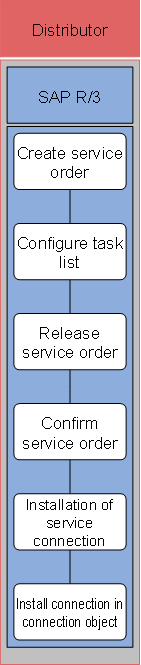
The following business process runs in SAP IS-U/CCS:
1. Create service order
You create a service order to describe the installation of a service connection.
2. Configure task list
If you use a configurable service order or contract, you can fully generate the service order in the background by evaluating a small number of self-defined characteristics.
3. Release service order
Release the service order as soon as planning is complete.
4. Confirm service order
By confirming working hours and used materials, you are posting the costs to the service order.
5. Installation of service connection
Once all tasks are complete, close the service order and enter an equipment master record for the new connection.
6. Install connection in connection object
You then install the service connection in a new or an existing connection object.
Result
At the end of the process, you have created a service connection in the system as an equipment master record and integrated it into your technical infrastructure by means of the link to the connection object. You have also entered all costs for creating the service connection in the service order. You can then settle the order internally or bill the customer using flat-rate billing or resource-related invoicing.