
 Utility Contract Analysis
Purpose
This business process provides you with numerous options for analyzing utility contract quotations and sales. You can use this business process to monitor the sales activities in your utility company.
Process Flow
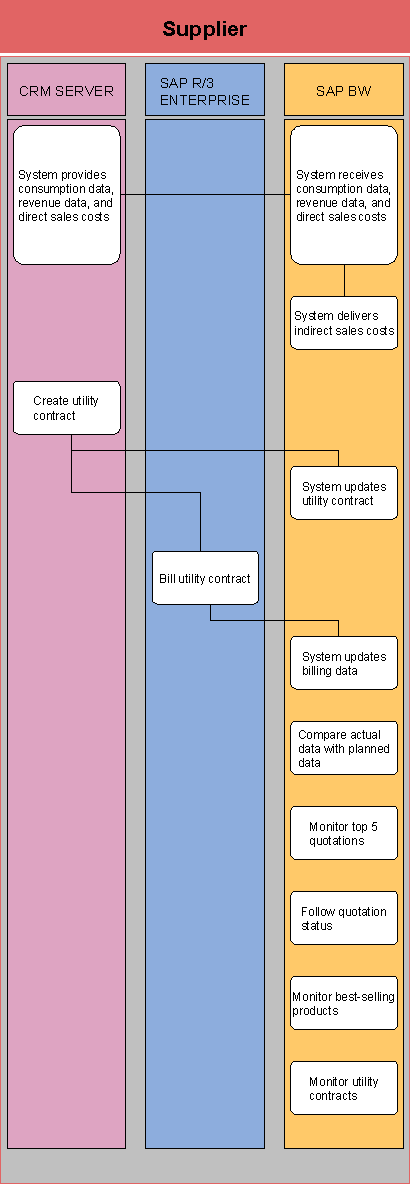
Sa..
1.
System delivers consumption data, revenue data,
and direct sales costs
SAP CRM delivers consumption data, revenue data, and direct sales costs to SAP
BW.
2.
System receives consumption data, revenue data,
and direct sales costs
SAP BW receives the data from SAP CRM.
3.
System delivers indirect sales costs
SAP BW uses the data entered to determine the indirect sales costs.
4.
Create utility contract
You create a utility contract in SAP CRM.
5.
System updates utility contract
The data determined is used to update the utility contract in SAP
BW.
6.
Bill utility contract
The utility contract is billed in SAP IS-U.
7.
System updates billing data
The billing data is updated correspondingly in SAP BW.
8.
Compare actual data with planned data
You compare the actual data with the planned data in SAP BW.
9.
Monitor top 5 quotations
In SAP BW you monitor the five most important business partners to whom you
have given a quotation.
10.
Follow quotation status
You follow the status of the quotations in SAP BW.
11.
Monitor best-selling products
In SAP BW you monitor which products have sold best.
12.
Monitor utility contracts
You monitor the number of signed contracts in SAP BW.