
 Server-Side Scripting Instructions: Layout
Definition
Server-Side Scripting Instructions: Layout
Definition 
Each individual page of a BSP application is defined using HTML. There are no restrictions in this respect. In addition to this, each page contains additional scripting instructions in order to ‘mix in’ the field attributes of the request (net data of the request data structure) with the HTML request form, or to issue server-side error messages. These scripting instructions are depicted below:

In the following example, the server-side scripting is shown in blue and references to the net data of the request data structure are shown in green in order to distinguish differences in the source code.
Defining the Scripting Language
Each page begins with the definition of the language user for the server-side scripting:
<%@ page language=“abap“ %>
Output of Server-Side Error Messages
Server-Side error messages are included in the source code in the following example:
<% Data: lt_message type uxb_t_message,
ls_message type uxb_s_message.
lt_message = application->get_messages( ).
if lt_message is not initial. %>
<p>
<table>
<tr>
<td>
<font color="#FF0000">
<% loop at lt_message into ls_message.%>
<div id="messageText" tabindex="0">
<%= ls_message-message. %>
</div>
<% endloop.%>
</font>
</td>
</tr>
</table>
</p>
<% endif.%>
For more information, see Error Handling in Web Request Forms.
Output of Online Text Repository Texts (OTR Texts)
The following source code displays the how OTR texts are called in the Online Text Repository:
<td width="170"><label for="name">
<%= otr(crm_service_webrequest_example/$firstname) %>,
<%= otr(crm_service_webrequest_example/$lastname) %>
</label></td>
For more
information on processing OTR texts, see  OTR
Directives.
OTR
Directives.
Defining Request Form Fields
The reference to input/output fields contained in the request data structure is defined in the <form> tag.
<form method="POST" >
...
</form>
The features of the request form fields are defined as text fields, selection buttons, etc in this <form> tag and the reference to the corresponding field in the request data structure is addressed through a path.
Form Mode (display/change)
You can use the following methods to switch input fields to change mode (the method returns “disabled“):
<%= application->disabled( '//…/…/…' ) %>
In create/change mode the method returns “ “. The setting of the mode is controlled using the URL that you use to call the HTML page of a BSP application. This is not considered in more depth in this context.
Defining Field Categories
The following examples for request form fields are described here as minimal definitions – more attributes (for example, size, max length,...) are also possible.
The following graphic gives an overview of the field categories shown here.
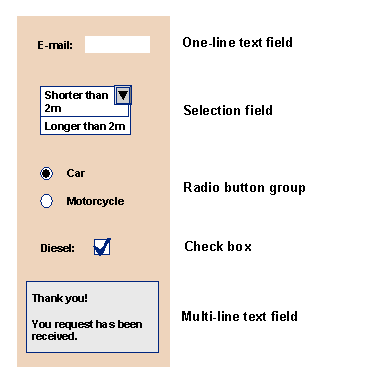
Graphic: Different Field Categories in the Request Form
One-Line Text Fields
<input <%= application->disabled( '//request/applicant/email' ) %>
type = ”text”
name = "//request/applicant/email"
value = "<%= application->get( '//request/applicant/email' ) %>" >

Assigning default request data entries:
If the request data structure is prepopulated with server-side data before the Web request form is displayed in the Web client (via the BAdI method FORM_ON_CREATION, for example with the business partner data of the requester) this data is then put in a text field as default values.
Dropdown Box
<select <%= application->disabled( '//request/car/length' ) %> size="1"
name="//request/car/length">
<option
<%= application->selected( path = '//request/car/length' value = '1' ) %>>
shorter
2m</option>
<option
m</option>
<option
<%= application->selected( path = '//request/car/length' value = '2' ) %>>
longer 2m</option>
</select>
Radio Button Group
A joint path is used for a radio button group. The values can be formed individually. The individual radio buttons are grouped by the same name:
<input type="radio" name="//request/car/type" value="1"
<%= application->checked( path = '//request/car/type' value = '1' ) %>
<%= application->disabled( '//request/car/type' ) %> /> Car
<input type="radio" name="//request/car/type" value="2"
<%=
application->checked( path = '//request/car/type' value = '2' ) %>
<%= application->disabled( '//request/car/type' ) %> /> Motorcycle
Checkboxes
With checkboxes it is necessary to create an additional input field of category “hidden” in addition to the check box. The hidden field fulfils the function that this value is always sent to the server even if the check box is not selected and no value is returned. As soon as the checkbox is selected, this value overrides the value of the hidden field.
This small trick is necessary in order to avoid a basic problem of HTML and Web browsers.
<input type=“hidden” name="//request/car/engine" value=""/>
<input type = "checkbox"
name = "//request/car/engine"
value = "X"
<%= application->disabled( '//request/car/engine' ) %>
<%= application->checked( path = '//request/car/engine' value = 'X' ) %> >
Multi-line Text Field
<textarea <%= application->readonly( '//request/comments' ) %>
name="//request/comments">
<%= application->get( '//request/comments' ) %>
</textarea>
See also:
Server-Side Scripting Instructions: Event Control
Layout Maintenance for Web Requests: Example