
 Sales Transaction
Definition
Business Transaction Category that is used to process sales processes in SAP CRM.
Use
You can define transaction types and assign the business transaction category Sales transaction to them.Which transaction types you define depends on the business processes in your enterprise.
Examples of transaction types are:
· Inquiry
You can set the transaction type depending on the business process in Customizing, and the system delivers all the attributes necessary for processing this transaction type.
In Customizing, you can define different attributes necessary for a business process for each transaction type.

You can, for example, define a special Telesales transaction type for entering orders in the Interaction Center. To do this, you should assign a Business activity as an additional business transaction category, so that a business activity is created each time an order is entered. You could also assign a specific partner determination procedure, if applicable.
Structure
The work area for all sales transaction types is made up of the document header and any number of document items.The work area for all sales transaction types is made up of the document header and any number of document items. The following diagram shows the structure of a sales transaction.
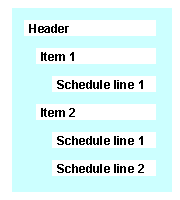
Header
General data which is available for the entire transaction is recorded in the transaction header. This includes the following data, for example:
· Sold-to party
· Business transaction type
· Purchase order number
· Purchase order date
You can enter products and order quantities in the transaction header, you can display prices, create texts, and you can link documents with the business transaction, and so on.
Item
Data at item level is only valid for each of the selected items. This includes, for example, the product number, the order quantity and the net value for an item. The delivery and payment terms, or purchase order data, can be entered at item level.
Certain data, for example the payment terms or partner data, can differ from the header data, if specific agreements have been met for an item.
Subitem
Dependent items, for example, the components for a configurable product, are presented as subitems of a main item.
For
more information, see  Main Items and
Subitems in the Sales Order.
Main Items and
Subitems in the Sales Order.
Schedule Line
An item can contain any number of schedule lines. The schedule line contains the requested quantity and the requested date for the item.
A customer issues a sales order for 20 pieces of a product. You enter this as an item in the sales order. You can, however, only deliver 10 pieces at present, and deliver the other 10 pieces the following month. This means that two deliveries must be scheduled. The data for these deliveries (date, quantities confirmed) is saved in two different schedule lines.

The sales transaction in the Interaction Center WebClient does not contain schedule lines.
For more information, see Schedule Lines.