Show TOC
Creating a Planning and Consolidation Connection for the Microsoft Platform
Procedure
Open Microsoft Office Excel or Microsoft Office PowerPoint.
Select the
EPM
tab.
Click
Log On
.
The
EPM - Logon
dialog box opens.
Click the browse button next to the
Connection
area.
Click
Create
.
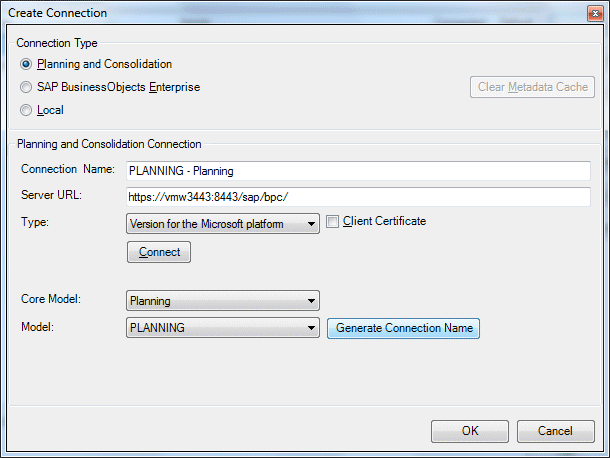
The
Create Connection
dialog box opens.
In the
Connection Type
area, select the
Planning and Consolidation
option.
The
EPM - Connection Manager
opens.
In the
Planning and Consolidation Connection
area, enter the Planning and Consolidation Server URL. For example:
https://vmw3443:8443/sap/bpc/
.
From the
Type
menu, select the
Version for the Microsoft platform
connection type.
Click
Connect
.
Enter your
User Name
and
Password
and click
Logon
.
Select a
Core Model
and a
Model
.
Click
Generate Connection Name
or enter manually a connection name.