Custom Members Order
When you create more than one custom member, it is very important that you order them according to the calculations order you want.
You can define the order you want by using the
arrow buttons on the right-hand side of the
Custom Member
Manager dialog box, which you can access by selecting
 EPM
EPM  Custom Members Manage Custom
Members
Custom Members Manage Custom
Members  .
.
Example
-
"Variance", based on the Period dimension, calculates the 2003 variance compared to 2002. The information in the Custom Member Editor is as follows:
-
Name: Variance
-
Dimension: Period
-
Expression: [Period].[All].[2003]- [Period].[All].[2002]
-
-
"Net profit / Profit b. Tax", based on the Account dimension, calculates the net profit percentage compared to profit before tax. The information in the Custom Member Editor is as follows:
-
Name: Net profit / Profit b. Tax
-
Dimension: Accounts
-
Expression: [Accounts].[All].[1-PL-Profit and Loss].[TR800 - Net Profit]/[Accounts].[All].[1-PL-Profit and Loss].[TR800 - Net Profit].[TR700 - Group profit before min int].[TR600 - Prof from ordinary ativities].[TR500 - Profit before tax]
-
Depending on the order you chose for the custom members, the resulting calculation in the cell at the intersection of the two members is different.
-
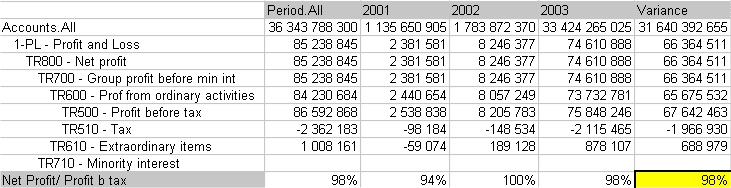
If you choose the order Variance and then Net Profit/Profit by tax, the result (98%) is as follows:
-
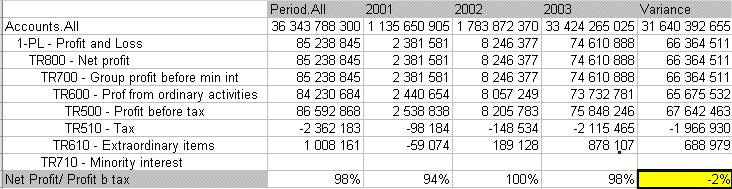
If you choose the order Net Profit/Profit by tax and then Variance, the result (-2%) is as follows: