 Accruing/Deferring Account Results
Accrual/deferral determines which interest and charges have been accrued between the last settlement and the defined key date. The system posts and saves the expense and revenue amounts as non-balance-changing turnovers (see Account).
The accrual/deferral run is used for information in accounting, and has the following functions:
The system calculates the settlement results as if for an update settlement run.
You can display the individual statement of interest and charges for each account as a list.
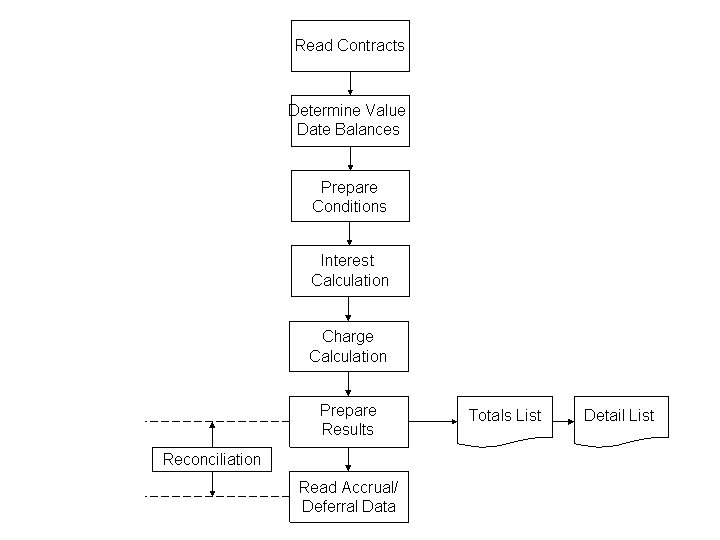
Process Flow of Accrual/Deferral
Integration
To start the account accrual/deferral, call the report Accrue/Defer Account Results
(RBCA_ACCRUE_RUN_PP
). For more information, see: Accruing/Deferring Account Results.
You can integrate the report in end-of-day processing. The accrual/deferral must be after the account settlement. If this is not the case, the system posts the accounts due on the accrual/deferral key date twice.
You need to start the report Accrue/Defer Account Results
in a settlement run other than the report Post Settlement Results.
You can call the interest accrual/deferral during the settlement process.
If you set the Check Posting Date PT
flag on the Settlement
tab page in account processing, then the system checks the posting date of payment transactions and the accrual/deferral key date.
To ensure that the system can no longer execute postings during the accrual/deferral period, you need to ensure that the posting date of the payment transaction is on or after the accrual/deferral key day. This also applies for normal settlement.
Prerequisites
The posting date for payment transactions is settled and the posting cut-off is executed.
Features
Interest Accruals/Deferrals
Interest accrual/deferral calculates the interest accrued for an account in the period between the last settlement and the accrual/deferral key date. For new, not yet settled accounts, the accrual/deferral interest calculation starts on either the account opening date or on the earliest value date before the account opening date.
When calculating interest, the system includes all postings whose posting date is on or before the key date. The system does not include any postings whose value date is after the key day.
 Note
Note
In the Customizing activity Define Calculation Period for Accrual/Deferral
, you can define whether or not the accrual/deferral run includes the interest and charges incurred on the last day of an accrual/deferral period (= accrual/deferral key date).
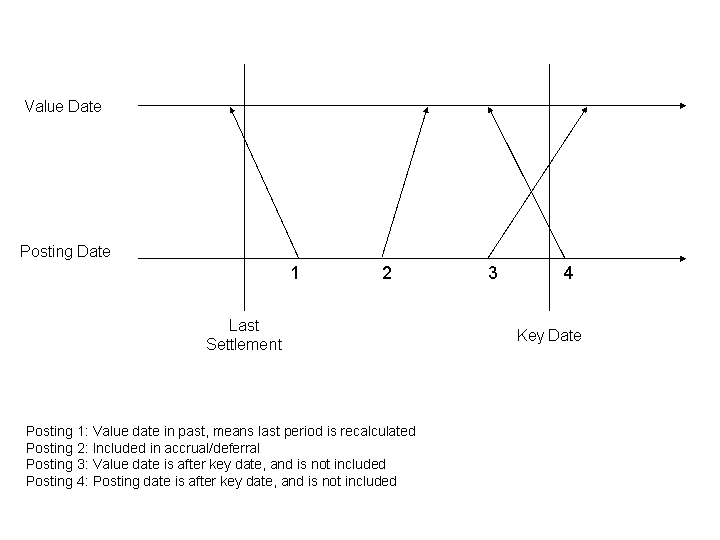
Connection Between Posting Date, Value Date, and Key Date
If a posting has a value date in a prior period, the system calculates the period again, and posts the difference to the previous settlement.
Charge Accrual/Deferral
The system calculates the charges from the last settlement or from the account opening date. Value dates in the past before the account opening date do not affect the accrual/deferral period for the charges.
The system calculates the charges pro rata for the relationship between the accrual/deferral period and the settlement period. The settlement date and the accrual/deferral key date can be any date. Therefore, the relevant period for the calculation is in calendar days.
General Ledger
To process the non-balance-changing turnovers from the accrual/deferral in the General Ledger (FI-GL), you can transfer these by means of a service interface to an analytical process component. You are provided with the report Distribute Accrual/Deferral Data
(RBCA_SNITEM_EX_RUN_PP
) for this purpose. To call the report, choose 
SAP Easy Access screen

Account Management
Periodic Tasks
Distribute Flow Data
Distribute Accrual/Deferral Data
 ..
..
Result Documentation
The system saves the accrual/deferral results as non-balance-changing turnovers (see Non-Balance-Changing Posting). To display the non-balance-changing turnovers, choose SAP Easy Access screen
Account Management
Account
Turnovers, Balances, and Key Figures
Non-Balance-Changing Turnovers
Display Non-Balance-Changing Turnovers
.
More Information
For more information about the report, see the system documentation. On the Accrue/Defer Account Results
screen, choose the  (
(Program Documentation
) button.
For more information about the general ledger connection in the analytical system, see General Ledger Connection (FS-BA-AN-GL) and the Integration Scenario Financial Accounting for Banks
in the SAP NetWeaver Process Integration.