 Document Status of the PLM Document
You can edit the PLM document using its methods. For more information, see PLM Document, under "Methods". If edited successfully, the document status of the PLM document can change.
The document status shows the processing progress of the PLM document. There are four different document status categories and their use can be obligatory or optional.
Document Status Category |
Use |
|---|---|
Scheduled |
Optional |
Active |
Required |
Inactive |
Optional |
Closed |
Required |
You can make settings for the document status in Customizing for
Account Management (FS-AM)
under

Posting Lock Management

Basic Settings
Define Document Status
 . The number of document statuses per document status category is not restricted.
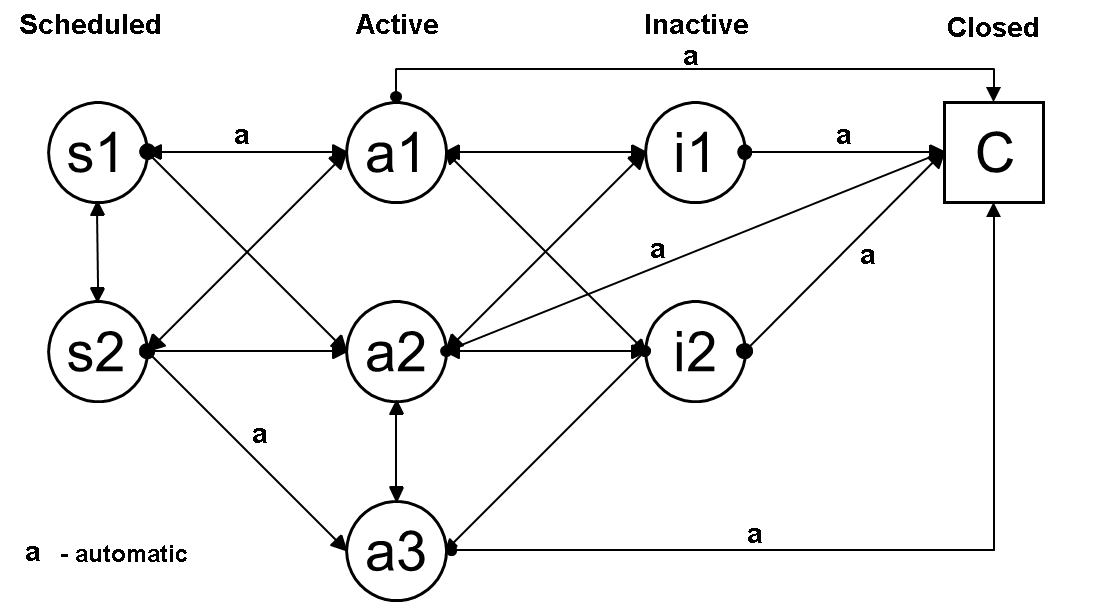
Example of a Status Graphic (Sample Customizing) for the PLM Document