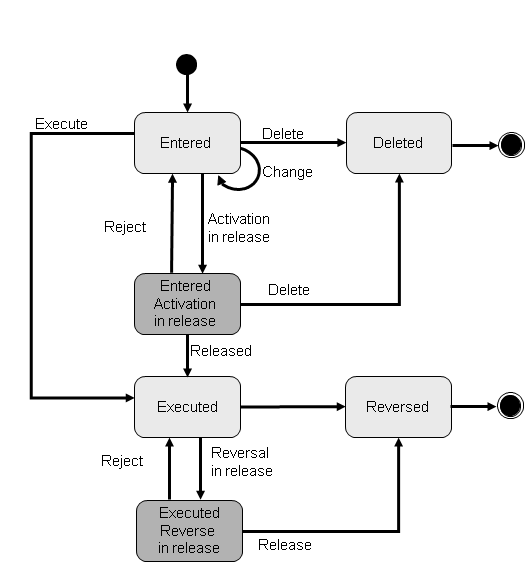
Order Status of the Payment Plan Change
You can process the payment plan change for a loan using its methods. For more information, see the Methods
section in the documentation for Payment Plan Change.
After processing, the order status can change. The following combinations of order status
, release status
, and operation to be released
describe the possible statuses of a payment plan change during processing.
Order Status | Release Status | Operation to Be Released |
|
|
|
|
|
|
|
|
|
|
|
|
|
|
|
|
|
|
The Operation to Be Released
checkbox, which you have set in Customizing for Account Management (FS-AM)
under 
Order Management

Basic Settings
Configure Order Category
 , determines which operation you can select as a release attribute.
If the Operation Relevant For Release
checkbox is set, you can define reasons for release that comprise the selected operations as release attributes and result in orders being placed in the release process. You do this in Customizing under Order Management
Payment Plan Change and Skip
Release
Assign Release Object to Release Procedure
.