
 Transport Layer Security on the SAP J2EE
Engine
Transport Layer Security on the SAP J2EE
Engine

Use
The SAP J2EE Engine supports the use of transport layer security for network communications. Depending on the protocol used for the connection, it supports SSL or Secure Network Communications (SNC). See the table below.
Transport Layer Security for the Protocol
Protocol |
Security Method Used |
Comment |
HTTP, P4, LDAP |
SSL |
SSL is a quasi-standard protocol developed by Netscape. It is used with an application protocol, for example, HTTP. |
RFC or DIAG |
SNC |
SNC is an interface that you can use to secure connections between SAP system components. |
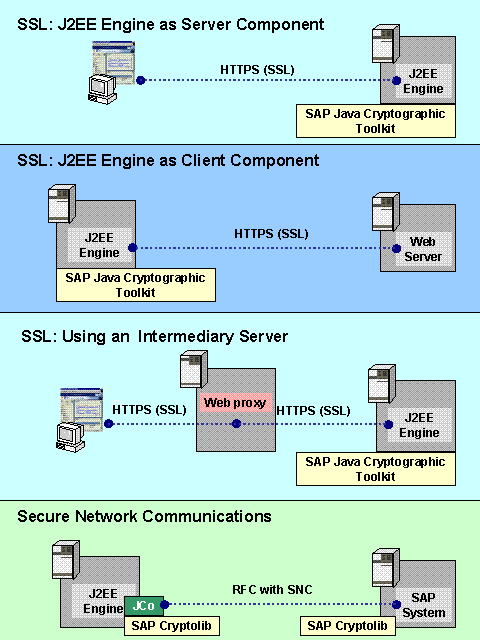
See the figure below for a complete overview of the supported scenarios:
Using Encryption with the SAP J2EE Engine
Prerequisites
· You need an external security provider to perform the cryptographic functions. The available products from SAP are:
¡ SSL: SAP Java Cryptographic Toolkit
¡ SNC: SAP Cryptographic Library (SAP Cryptolib)

The SAP provides the SAP Cryptographic Library to use for securing server-to-server connections with SNC. Other products are also available. For more information, see the SAP Software Partner Program at www.sap.com/softwarepartner.
· The SAP J2EE Engine must possess a security environment:
¡ For SSL, this environment is stored in the SAP J2EE Engine’s keystore, which you can maintain using the Key Storage Service in the Visual Administrator.
¡ For SNC, the server uses the RFC layer with the Java Connector. In this case, the SAP J2EE Engine’s security environment is located in a Personal Security Environment (PSE) in the file system.
Features
When using SSL or SNC to encrypt data communications at the network layer, you make use of the following security features:
· Authentication
With server-side authentication, the server identifies itself to the client when the connection is established, which reduces the risk of using “fake” servers to gain information from clients.
With mutual authentication, the both the client and the server are authenticated when the connection is established. You can use client-side authentication, for example, to authenticate users using SSL instead of using user IDs and passwords.
· Data integrity
The data being transferred between the client and the server is protected so that any manipulation of the data is detected.
· Data privacy
The data being transferred between the client and the server is also encrypted, which provides for privacy protection. An eavesdropper cannot access the data.
See also:
· Configuring the Use of SSL on the SAP J2EE Engine
· Using SSL to the SAP J2EE Engine via the ICM
· Using SSL With an Intermediary Server
· Configuring SNC (SAP J2EE Engine -> ABAP Engine)
·
 Additional Keystore
and Cryptographic Functions
Additional Keystore
and Cryptographic Functions
· SNC User’s Manual, which is available on the SAP Service Marketplace at service.sap.com/security
·
The Secure Connection
Factory API for HTTPS Clients