
 Object-Based Navigation

Purpose
To provide the knowledge necessary for portal content developers to create iViews using the capabilities of object-based navigation.
Object-based navigation (OBN) offers portal users an additional method of navigation, which is role-dependent and based on business objects from productive back-end systems.
OBN is based on a structure of business objects having one or more operations attached to them, where each operation can have one or more iViews to implement it. Each operation has a priority, and selecting an OBN link in an iView does one of the following:
· executes the default operation, the one with the highest priority (if the operation has an implementing iView for the role of the user)
· presents a context menu displaying all of the operations attached to the main business object of the source iView (where those operations have implementing iViews for the role of the user)
The primary capability offered by OBN is that the iView returning data to the user, during navigation, is accessed dynamically during runtime, based on the user’s role. In other words, two different users may perform the same navigation operation, clicking the same link from the same iView, and the data returned to each of them will be different because of role dependency.

Familiarity
with the standard documentation of object-based navigation is recommended. For
information, see
 Object-Based
Navigation.
Object-Based
Navigation.
Use Case
This use case deals with the implementation of the default operation.
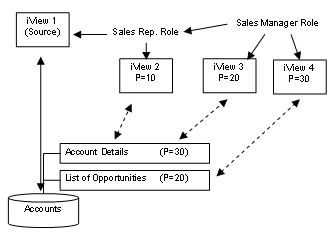
Two users in a company with separate roles, a sales representative and a sales manager, each choose a link in an iView representing a specific account, based on the same business object. This business object has several operations attached to it, one of which is Account Details, another being List of Opportunities. The sales representative only has permission to see an iView that implements Account Details. The sales manager is authorized to see the iViews implementing both operations. However, for the Sales Manager role, the operation List of Opportunities has a higher priority.