
Pushbuttons on the Selection
Screen 
To create a pushbutton on the selection screen (similar to pushbuttons on screens), you use:
SELECTION SCREEN
PUSHBUTTON [/]<pos(len)> <push>
USER-COMMAND
<ucom> [MODIF ID <key>].
The [/]<pos(len)> parameters and the MODIF IF addition have the same function as for the formatting options for underlines and comments.
<push> determines the pushbutton text. For <push>, you can specify a text symbol or a field name with a maximum length of eight characters. This character field must not be declared with the DATA statement, but is generated automatically with length <len>. The field must be filled before the selection screen is called.
For <ucom>, you must specify a code of up to four characters. When the user clicks the pushbutton on the selection screen, <ucom> is entered in the UCOMM of the SSCRFIELDS interface work area. You must use the TABLES statement to declare the SSCRFIELDS structure. The contents of the SSCRFIELDS-UCOMM field can be processed during the AT SELECTION-SCREEN event.

REPORT DEMO.
TABLES SSCRFIELDS.
DATA FLAG.
SELECTION-SCREEN:
BEGIN OF SCREEN 500 AS WINDOW TITLE TIT,
BEGIN OF LINE,
PUSHBUTTON 2(10) BUT1 USER-COMMAND
CLI1,
PUSHBUTTON 12(10) TEXT-020 USER-COMMAND
CLI2,
END OF LINE,
BEGIN OF LINE,
PUSHBUTTON 2(10) BUT3 USER-COMMAND
CLI3,
PUSHBUTTON 12(10) TEXT-040 USER-COMMAND
CLI4,
END OF LINE,
END OF SCREEN 500.
AT SELECTION-SCREEN.
CASE SSCRFIELDS.
WHEN 'CLI1'.
FLAG = '1'.
WHEN 'CLI2'.
FLAG = '2'.
WHEN 'CLI3'.
FLAG = '3'.
WHEN 'CLI4'.
FLAG = '4'.
ENDCASE.
START-OF-SELECTION.
TIT = 'Four Buttons'.
BUT1 = 'Button 1'.
BUT3 = 'Button 3'.
CALL SELECTION-SCREEN 500 STARTING AT 10 10.
CASE FLAG.
WHEN '1'.
WRITE / 'Button 1 was clicked'.
WHEN '2'.
WRITE / 'Button 2 was clicked'.
WHEN '3'.
WRITE / 'Button 3 was clicked'.
WHEN '4'.
WRITE / 'Button 4 was clicked'.
WHEN OTHERS.
WRITE / 'No Button was clicked'.
ENDCASE.
This example defines four pushbuttons on a selection screen that is displayed as a dialog box. The selection screen is defined in a statement chain for keyword SELECTION-SCREEN.
If the text symbols TEXT-020 and TEXT-040 are defined as 'Button 2' and 'Button 4', the four pushbuttons appear as follows on the selection screen displayed as a dialog box.
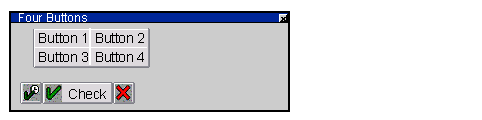
CLI1, CLI2, CLI3 and CLI4 are used for <ucom>. When the user clicks one of the pushbuttons, the AT SELECTION-SCREEN event is triggered, and the FLAG field is set. The FLAG field can be further processed during subsequent program flow after the user has chosen Execute.