 Corporate Investment Management

Corporate Investment Management
Purpose
The analytical application, Corporate Investment Management, supports group-wide, cross-system control and monitoring of the investment process from the planning stage through actual implementation.
The aim is, for the purposes of group-wide investment planning, to bring the strategic specifications at the group level and the operative requirements of the individual subsidiaries into agreement.
Corporate Investment Management, therefore, brings together local planning from different operative, transactional systems using Business Information Warehouse Technology (SAP BW), and makes the data available for central business analyses in an optimized form.
Corporate Investment Management makes it possible to integrate
local planning in the strategic group perspective. Reports based on group shares are possible. In Strategic Enterprise Management (SEM-BPS), you can simulate planning and analysis of scenarios, even if they are not reflected by the actual operative situation. The strategic information gleaned can then be compared to operative requirements in Corporate Investment Management.The pushback process ensures that strategic planning data that is created in SEM is transferred back to the different operative systems in the local currency.
During operative implementation in the investment process, Corporate Investment Management provides constant checks in the form of plan/actual comparisons. The information supplied by these comparisons provides the basis for continuous refinement of the investment process, from planning through implementation.
The distribution of the application to various systems signifies the decoupling of the overall process, and optimal scalability in relation to the group size.
Corporate Investment Management uses a data model that is especially optimized for strategic management accounting at the group level. The OLTP planning structures of the individual companies are seamlessly integrated in this data model.
The data model of Corporate Investment Management allows you to summarize the operative data for your individual companies and to define a group-wide structure for investment management. This supports and simplifies your management accounting tasks, and assists you in orienting your group investment volume to strategic considerations.
You can centrally plan your strategic investment volume at the level of strategic organizational units and on individual measures of strategic importance, while at the same time being able to view this planning side-by-side with your operative data.
The data model of Corporate Investment Management is based on the following concepts:
Prerequisites
Release Prerequisites
|
Software Components |
Release |
Comments |
|
BW |
3.0A |
|
|
(2.1C starting with Patch 7) |
Missing content |
|
|
SEM-BPS |
3.0B |
|
|
PI |
PI 2001.1 |
|
|
SAP R/3 |
4.5B, 4.6B, 4.6C, 4.7 (SAP Enterprise) |
The functions of Corporate Investment Management described in this document are available starting from the release levels and support package levels listed above. In SAP R/3 the upgrade on these release levels simply involves importing the Plug In for BW.
Due to the limitations as stated on BW Release 2.1C, certain content objects have to be defined or modified manually. The objects involved are:
You can make these modifications, if you wish, as part of a customer project. This modification does not cause any problems with the implementation of Support Packages.
Organizational Requirements in OLTP
In order to use Corporate Investment Management, you need to ensure certain procedures in your organization regarding maintenance of master data for the objects in the OLTP that carry plan values. The requirements for the individual objects are described below.

For Corporate Investment Management, only the copies of master data that are loaded into BW have any significance.
As a consequence, it also possible for you, the customer, to supply data for the problematic attributes (0IM_CORPOR and the
It is even possible to completely define a new strategic characteristic as an attribute of a program position in BW. This is possible, as long as you are able to define your own update rule from OLTP master for this attribute, and this update rule meets the organizational requirements.
Master Data of Program Positions
In the investment program structure, the sequence of these values in a given branch of the hierarchy has to be, from the top down: 2 -> 1 -> 0. The values can only have this 2 -> 1 -> 0 sequence once. This means: below a program position of type 1, only program positions of type 1 or 0 are allowed; below a program position of type 0, only other program positions of type 0 are allowed. In a given branch of the hierarchy, more than one program position of the same type is allowed (including type 1). The program positions at one level of the investment program hierarchy can have different values in this field.
Before Release 4.6C, there was no separate field in the SAP R/3 master data for entering this value. As a workaround, you can enter the values in the Priority field and extract them to BW. In BW the values are stored in the master data of the program position in the 0IM_CORPOR attribute.
In the SAP Enterprise Release, there will be a separate field for this value in the SAP R/3 master data. This field will also be subject to checks.
Master Data of Appropriation Requests
You have to enter a value in the master data of appropriation requests to indicate the role they have in strategic planning:
In SAP R/3 there is no separate field in the master data for entering this value. As a workaround, you can enter the values in the Priority field and extract them to BW. In BW the values are stored in the master data of the appropriation request in the 0IM_CORPOR attribute.
In the SAP Enterprise Release, there will be a separate field for this value in the SAP R/3 master data.
Master Data of WBS Elements
You have to enter a value in the master data of WBS elements to indicate the role they have in strategic planning:
In SAP R/3 there is no separate field in the master data for entering this value. As a workaround, you can enter the values in the Priority field and extract them to BW. In BW the values are stored in the master data of the WBS element in the 0IM_CORPOR attribute.
You only have to enter the value on the WBS element that is directly assigned to the investment program. The value then applies implicitly for all WBS elements subordinate to it.
Process Flow
Overall Process
An Example of the Overall Concept
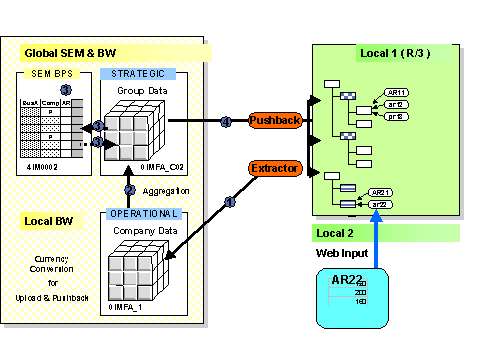
Data Model in BW and SEM-BPS
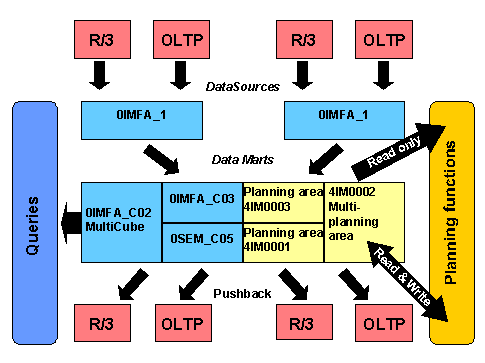
The graphic shows the technical names of the InfoCubes and planning areas involved in Corporate IM, along with their position in the data flow of the overall process:
Currencies
Local planning is generally stored on the database in the OLTP in controlling area currency (CAC) and object currency (OC). (Before Release 4.6C, values for appropriation requests and program positions were stored only in the controlling area currency.) If the company code currency differs from the controlling area currency, then the object currency has to be the same as the company code currency.You have to carry out group planning in SEM-BPS in one currency, the group currency (GC). For different controlling areas and objects, the group currency can be any one of the following: the controlling area currency, the object currency or neither of these. The consequence is that currency translation may be necessary.
The concept for currency translation into the group currency in Corporate Investment Management is based on the following principles:
If all of the controlling areas involved in group planning use the same currency, then the currency translation is not needed. In this case, the currency type for the controlling area currency (0CURTYPE = 20) serves as the basis for group planning.
Definition of Group Currency and the Translation Logic
You define the group currency and the exchange rate type for the currency translation in Corporate Investment Management using customer enhancement AIBW0002
You assign the enhancement to an enhancement project and activate it using transaction CMOD. For more information on activating the enhancement and on additional parameters, refer to the online documentation for customer enhancements in transaction SMOD.
The key date for the currency translation is determined for each transferred record by the following sequence of InfoObjects:
Currency Translation at Upload
|
Situation |
Values in GC Determined By |
|
OC = GC |
Copied from OC |
|
CAC = GC |
Copied from CAC |
|
Other |
Currency translation from CAC to GC |
The currency translation at upload takes place in the update rules for InfoCube 0IMFA_1. The corresponding update rules will not be shipped until BW Release 3.0A.
Currency type 30 for the group currency is updated only when enhancement AIBW0002 is activated. The system then reads the master data of the posted InfoObjects, in order to determine the object currency by means of the 0OBJ_CURR attribute. Therefore you have to load this master data before loading the transaction data. The DataSources for transaction data have to be loaded in such a way that the values in controlling area currency and object currency are selected.
Currency Translation During Pushback
|
Situation |
Transfer of Values to SAP R/3 |
|
GC = OC |
In OC |
|
GC = CAC |
In CAC |
|
Other |
After currency translation from GC to CAC |
Also during pushback, the system reads the master data of the InfoObjects involved to determine the object currency.
The source currency during pushback is determined solely by the currency of the data records stored in the InfoCube. This currency is specified in the planning layouts and planning functions in SEM-BPS. Therefore, it is not required that this currency is the same as the group currency defined using Exit AIBW0001.
It is therefore also possible to plan in SEM-BPS in a local currency that differs from the group currency, and to transfer these value back to SAP-R/3 using the pushback.
Roles of Objects in Strategic Planning
InfoObject 0IM_CORPOR is an attribute in the master data of program positions, appropriation requests, and WBS elements in BW. It determines the role of the objects in strategic planning.
Before Release 4.6C, there was no corresponding attribute in the SAP R/3 master data.
Starting in PI 2001.1, the master data extractors supply this characteristic using the values of the Priority characteristic.
You can also set the 0IM_CORPOR attribute using a different logic in update rules you define yourself for BW master data (refer also to Organizational Requirements in SAP R/3).
Program Positions
|
InfoObject |
Values of 0IM_CORPOR |
Meaning |
Extraction from SAP R/3 Field |
|
0PROG_POS |
Before 4.6C : IMPR-PPRIO SAP Enterprise : IMPR- RHIER |
||
|
0 |
Local detail position (default) |
||
|
1 |
Strategic program position |
||
|
2 |
Totals position |
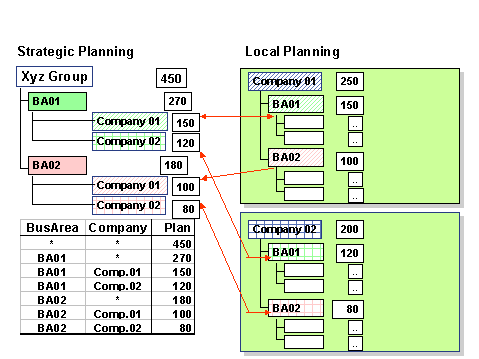
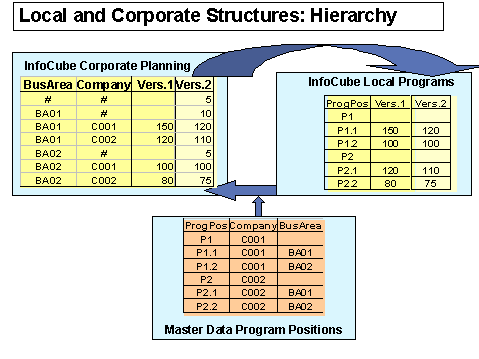
During pushback, the system matches the values of strategic characteristics entered in SEM-BPS to program positions. The result of this matching is always a strategic program position. After the matching, the pushback transfers the values to the strategic program positions in SAP R/3, and rolls them up on totals positions.
In the SAP Enterprise Release, the system ensures that you cannot enter values directly on totals positions in SAP R/3 planning. The distributable value of a totals position is therefore always zero. Any distributable values that were entered in other release levels from local planning on totals positions are not copied in the update rules of InfoCube 0IMFA_C03.
Local detail positions are displayed as totals in SEM planning on the strategic characteristics of their superior strategic program position. Pushback does not transfer any values to local detail positions. Local detail positions are planned in total in SEM-BPS by means of their superior strategic program position.
Appropriation Requests
|
InfoObject |
Values of 0IM_CORPOR |
Meaning |
Extraction from SAP R/3 Field |
|
0APPR_REQU |
Before 4.6C : IMAK- PRIORI SAP Enterprise : IMAK-STRATFLG |
||
|
1 |
Strategic |
||
|
2 |
Local |
When InfoCube 0IMFA_C03 is updated, the 0APPR_REQU characteristic is set to its initial value for those appropriation requests that are designated as local based on 0IM_CORPOR. The values are summarized based on the 0APPR_REQU characteristic as a result.
It is still possible to distinguish the plan on local appropriation requests from plan on program positions, using InfoObject 0IM_OBJ in InfoCube 0IMFA_C03. This means that it is possible to display the plan of appropriation requests that are designated as local even after the summarization. You can display them in total under a program position, using the Plan on Appropriation Requests restricted key figure.
WBS Elements
|
InfoObject |
Values of 0IM_CORPOR |
Meaning |
Extraction from SAP R/3 Field |
|
0WBS_ELEMT |
PRPS-PSPRI |
||
|
1 |
Strategic |
||
|
2 |
Local |
When InfoCube 0IMFA_C03 is updated via DataMart 80IMFA_1, the subprojects belonging to the program are summarized if they are designated as local. This is controlled by the 0IM_CORPOR attribute on the WBS element assigned to the investment program.
It is still possible to distinguish the plan on local WBS elements from plan on program positions using InfoObject 0IM_OBJ in InfoCube 0IMFA_C03. This means that it is possible to display the plan of WBS elements that are designated as local even after the summarization. You can display them in total under a program position, using the Plan on Measures restricted key figure.
Transactions
Definition of Strategic Characteristics
You define strategic characteristics using settings in transaction AIBW01.
You can choose the strategic characteristics from the attributes of InfoObject 0PROG_POS. SAP supplies a content example in the standard system. This example is based on strategic characteristics 0CO_AREA, 0COMP_CODE and 0PLANT. However, you could also use other attributes of the program position as strategic characteristics (for example, 0BUS_AREA and 0COMPANY).
The settings made in transaction AIBW01 are assessed only by the pushback function and in the matching-planning function for program positions. However, you also have to define the following objects so that they are consistent with the strategic characteristics:
Check If Strategic Characteristics Combinations Are Unique
After all master data for InfoObject 0PROG_POS has been loaded into the BW System, you can use transaction AIBW02 to check if the assignment of strategic characteristics combinations to strategic program positions is unique. The assignment has to be unique in order for matching to function properly.
InfoCubes
The following InfoCubes were created for CIM:
Corporate IM: Strategic Planning/Operative Data Corporate IM: Operative Data Corporate IM: Group Shares.Planning Areas
Planning Area 4IM0003 - Corporate IM: Operative Data
Planning area 4IM0003 makes it possible to access the data of InfoCube 0IMFA_C03 using the planning functions of multi-planning area 4IM0002. Access should be read only. The data can be used for comparison columns and copy functions.
Planning Area 4IM0001 - Corporate IM: Strategic Planning
Planning area 4IM0001 makes it possible to access the data of InfoCube 0SEM_C05. Access to this data can be read and write.
There is an example planning application defined on the planning area, for investment planning for a beverage factory in SEM-BPS.
In addition, the planning area contains planning levels for the matching and pushback functions of Corporate Investment Management. These planning levels are defined so they contain only the InfoObjects necessary for these planning functions.
Matching
The planning function determines the strategic program positions that correspond to the strategic characteristics combinations planned in SEM-BPS. It then writes them to the corresponding fields of InfoCube 0SEM_C05.
This planning function belongs to the "Exit" type.
For more detailed information on the planning function, refer to the online system documentation for function module UPB_CI_PUSHBACK_MATCH_IP.
Pushback of Program Positions
The planning function transfers the values planned on the strategic characteristics combinations back to the strategic program positions in SAP R/3 Systems.
This planning function belongs to the "Exit" type.
For more detailed information on the planning function, refer to the online system documentation for function module UPB_CI_PUSHBACK_MATCH_IP.
Pushback of Appropriation Requests
The planning function transfers the values planned on appropriation requests back to the SAP R/3 Systems.
This planning function belongs to the "Exit" type.
For more detailed information on the planning function, refer to the online system documentation for function module UPB_CI_PUSHBACK_IQ.
Pushback of WBS Elements
The planning function transfers the values planned on WBS elements back to the SAP R/3 Systems.
This planning function belongs to the "Exit" type.
For more detailed information on the planning function, refer to the online system documentation for function module UPB_CI_PUSHBACK_PR.
Multi-Planning Area 4IM0002 - Corporate IM: Group Planning
Multi-planning area 4IM0002 consists of planning areas 4IM0001 and 4IM0003. You can define the planning functions for planning and simulation of capital investments at group level on this planning area.
The operative data from local planning is available on this planning area for copy functions and comparison columns.
The generic planning framework of SEM-BPS ensures a large degree of flexibility for defining planning and simulation functions and modifying them to reflect your own requirements and processes.
The content SAP provides represents only some of the basic functions for group planning, but you have many more options.
Copying Local Planning to Strategic Planning
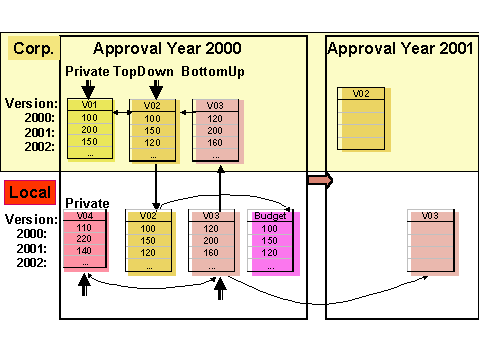
Using the copy function, you can transfer values from local planning to a new plan version for strategic planning as default values for manual planning.
When you use this function, the system copies the assignment of the values to the strategic characteristics, WBS elements and appropriation requests, but not to the local program positions. However, you can determine the correct strategic program positions using the matching function. The values of the local detail positions are contained directly in the values of the strategic program positions, once copying and matching have been performed.
Manual Planning
In the layouts for manual planning, you can manually modify the strategic planning values. You can see the local planning values in the comparison columns. You can plan on strategic characteristics, appropriation requests and WBS elements.
Both bottom-up and top-down planning are possible.
In the case of bottom-up planning, each change to a plan value leads to a direct change for the same amount to the overall investment volume.
In the case of top-down planning, however, you can only distribute values and increase detail in the planning on lower level organizational units. (For example, you could distribute the plan values of a company code to the plants in that company code.)
You can modify layouts for manual planning by copying key characteristics to the header and defining multiple columns for the years to be planned. You thereby optimally fulfill your enterprise’s individual needs and those of your planners.
Deleting Strategic Planning
Using this planning function, you can delete a version of strategic planning if necessary.