
 Portal Content Directory and Portal
Catalog
Portal Content Directory and Portal
Catalog 
The Portal Content Directory (PCD) is the central persistence for all portal objects. This includes for example storage of the metadata for the content objects (roles, worksets, etc.) and the relationship between the objects.
The PCD consists of three layers:
· Persistence layer
· Generic layer
· Semantic layer
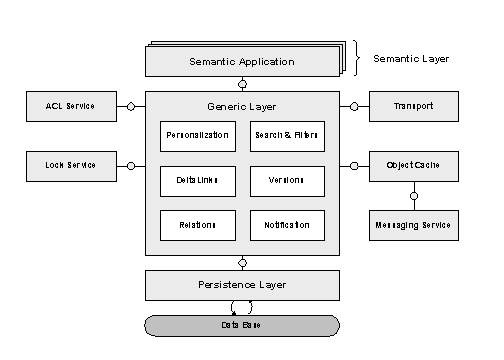
The generic layer of the PCD is the persistence infrastructure for content objects. It provides the following functions:
· Delta links for reusing object instances
· Creation of relationships between objects
· Generic transport mechanism
· Personalization
· Object notification
· Versioning
· Permissions by using Access Control Lists (ACLs)
· Filter mechanism and search
The content objects reside in the semantic layer of the PCD. The objects residing in the semantic layer of the PCD can access the functions provided by the generic layer (delta links, personalization, transport, etc.).
For
information about the configuration of the Portal Content Directory see Configuration for
the Portal Content Directory. The section  Portal Content
Directory (PCD) tells you which tools support you when you are looking for
errors in the PCD.
Portal Content
Directory (PCD) tells you which tools support you when you are looking for
errors in the PCD.
The Portal Catalog
represents a certain view on the data of the PCD on the user interface. You
can define this view yourself. The Portal Catalog is part of the Portal Content
Studio, the administration tool with which you can create and edit portal
content. The Portal Catalog permits access to the content objects stored in
the PCD using a tree structure.