Creating Delta Links
Use
Three methods for creating delta links are described below.
Procedure
|
Procedure |
Description |
Objects |
|
You create an object based on a template. |
The object inherits
all the properties from the template object on which it is based. The new object (target object) has a delta
link relationship to the object on which it was based (source object).
See also |
This is true for the following objects: pages, iViews and layouts. |
|
You insert objects in other objects as a delta link. |
The following scenarios are possible: · Add iViews, pages, worksets and roles to roles · Add iViews, pages and worksets to worksets · Add iViews and pages to pages |
This is true for
all content objects. To find out
how to link for example objects to roles and worksets, read |
|
In the Portal Catalog you create a new object by copying existing objects and adding them elsewhere as a delta link. |
You can find a
precise description under |
This is true for all content objects. |
If you create delta
links in other objects by insertion and make changes to the inserted objects,
these changes are visualized as deltas. For more information see  Visualization of
Modified Linked Objects.
Visualization of
Modified Linked Objects.
Example
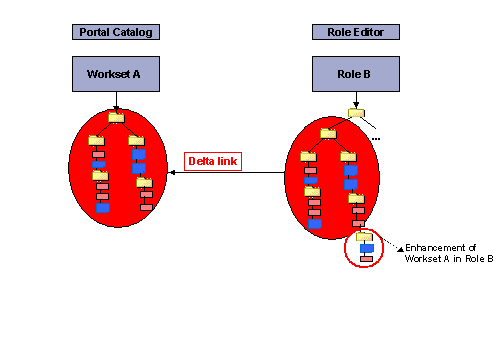
The following graphic shows workset A, which is added to role B with a delta link. You can change the linked workset in role B (for example, add entries), without changing the original or source object of workset A. For example, you can make enhancements to the hierarchy of the linked workset; the source object is not changed.