
 Creating Structures
Use
A structure (structured type) consists of structure elements. The individual elements belong to element types. A structure element can also reference an elementary type.
Data type descriptions in the form of structures are used in Web applications and can be created in the Java Dictionary independently of the program code.
Structures created in the Java Dictionary can be reused in different Web Dynpro contexts.
Procedure
1. In the Dictionary Explorer, position the cursor on Structures and choose Create Structure from the context menu.
2. Enter a name for the package and a name for the structure.
3. In the Description field, enter a short description for the structure.
4. Choose Add Column to create the elements of the structure.
If you choose the Simple Type tab in the following dialog box, the element of the structure refers to a data type defined in the Java Dictionary. In the Built-in Type tab, define the data type of the element.
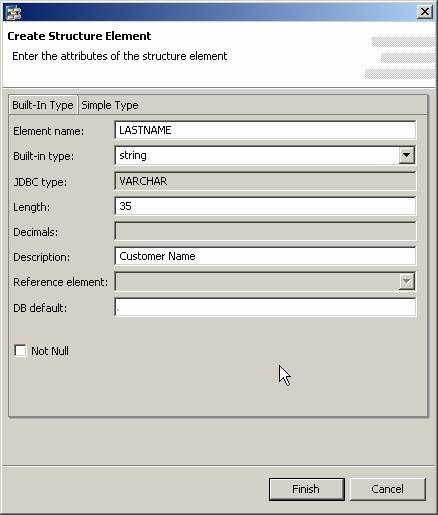
Built-in Type
Ў Enter a name for the element in the Element Name field. The name may only contain letters, digits, and underscore lines, and it must begin with a letter.
Ў In the Built-in Type field, choose a data type. The JDBC Type field is automatically set and provides information on the underlying, database-independent JDBC type that results from the selected Built-in Type and from the length entered for the field.
Ў In the following fields, you can enter the length, number of decimal places, and a short description, if required.
Ў If required, enter the DB Default. For more information, refer to the section Initial Values.
Ў If required, select the checkbox Not Null. For more information, refer to the section Initial Values.
Simple Type
Ў Choose Simple Type.
Enter a name for the element, the package in which the simple type is contained, and the simple type. Thus you can include predefined data types in a structure. You can also choose Browse and select a package. For more information, see Creating Data Types.

To create reference fields for currency fields, choose Browse. For more information, see Reference Fields.
5.
To save your
entries, choose  (Save
All Metadata).
(Save
All Metadata).
See also: