
 XML for Analysis
Purpose
XML for Analysis is a protocol for exchanging analytical data between client applications and servers, using HTTP and SOAP (Simple Object Access Protocol), as a Web service. Implementing XML for Analysis in SAP NetWeaver Business Intelligence enables third-party reporting tools that are connected to SAP BI to communicate directly with the OLAP processor.
Unlike OLE DB, XML for Analysis provides universal data access to a particular source over the Internet, without the client having to set up a special component.
XML for Analysis is optimized for the Internet in various ways:
· Time spent on queries to the server is kept to a minimum.
· Client queries are stateless by default. This means that after the client has obtained the required data, they are disconnected from the Web server.
In this way, tolerance to errors and the scalability of a source (the maximum permitted number of users) is maximized.
Integration
XML for Analysis is available automatically as a Web service after installing a BI system. The URL of a Web service has to be structured according to the following schema:
<Protocol>://<Server>:<Port>/sap/bw/xml/soap/xmla
A description of the Web service can be called using a URL, the schema of which corresponds to the following syntax:
<Protocol>://<Server>:<Port>/sap/bw/xml/soap/xmla?wsdl

For more
information on which values are used for the place holders in the specified
URL schema , see  ICF Services in SAP
BI.
ICF Services in SAP
BI.
Features
Specification XML for Analysis Version 1.1 from Microsoft forms the basis for the implementation of XML for Analysis in BI.
The following table lists the methods that determine the specification for a stateless data request or data manipulation.
XMLA methods
Methods |
Description |
Discover |
This method is used to query metadata and master data. (This corresponds to the BAPI MDDataProviderBW).
Discover ( [in] RequestType As EnumString, [in] Restrictions As Restrictions, [in] Properties As Properties, [out] Result As Rowset) RequestType determines the structure and contents of the resulting set via the return parameter (for example DISCOVER_DATASOURCES, MDSCHEMA_CUBES, MDSCHEMA_DIMENSIONS). Restrictions determine constraints for the resulting set column in order to filter the results row. This is a required parameter that can, however, remain empty. Properties determine XMLA properties, such as return format of the result set, timeout, local properties, with which the data should be formatted. |
Execute |
You can execute MDX commands with this method to receive the corresponding result set. (This corresponds to the BAPI MDDataSetBW).
Execute ( [in] Command As Command, [in] Properties As Properties, [out] Result As Resultset) Command specifies a provider-specific command for execution. Properties determine XMLA properties, such as return format of the result set, timeout, local properties, with which the data should be formatted. |

Constraints
XML for Analysis is not restricted to a specific platform, application or development language.
Example
The following graphic illustrates (based on the XMLA specification from Microsoft) a possible implementation of an XMLA Web service:
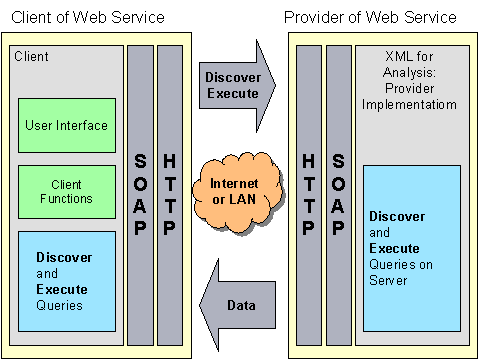
After the client has received the URL of a server that offers Web service, he or she sends Discover- and Execute queries to the server using the SOAP-/HTTP protocol.
The server creates an instance of the XMLA provider that processes the Discover- and Execute queries. The XMLA provider loads the required data, embeds them in XML and sends the data to the client as XML.