
 Object Editor Interface
This section describes general interface and tools available in the editing area in the Portal Content Studio, with the exception of the Property Editor, which is described in Property Editor.
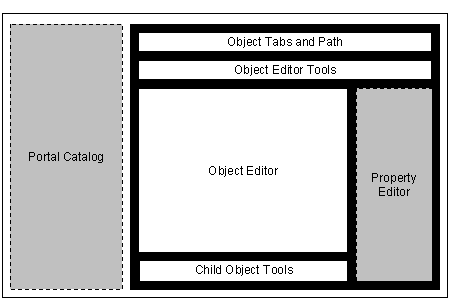
Wireframe schematic of the Portal Content Studio focusing on the Object Editor (black background)
The Object Editor user interface comprises the following:
Area |
Description |
Object tabs and path |
The tabs located at the top of the editing area show which objects you are currently editing. Each tab indicates a different parent object or folder that you have opened from the Portal Catalog. The name of the object is displayed in the tab. · Click a tab to switch between objects/editors. If you are editing a child object that has been assigned to a parent object in the Portal Catalog, it will be displayed under the tab of the parent object. When a child object is brought into focus in the editing area, the path located below the tabs, indicates the hierarchical path of the child object in relation to its parent. · Click an entry in the path to switch to the editor of that item. |
Object editor tools |
Provides tools for performing actions and operations on the object currently in focus in the editing area. This area displays only the tools valid to the object type currently in focus. |
Object editor |
Displays the respective object editor interface of the object being edited. For example, the Page Editor shows page layout and content (iViews and pages) assigned to the page being edited.
If the object being edited does not use a specialized editor, such as iViews, this area is minimized and only the Property Editor is displayed. |
Child object tools |
Provides tools that are specific to child objects. For example, in the Page Editor, it provides tools for handling iViews (the child objects) that are assigned to a particular page (the parent object) you have opened; such a tool would be the Edit button for opening a selected iView from the Page Editor. |
Property Editor |
The Property Editor is a generic editor used by all object editors in the Portal Content Studio. The Property Editor enables you to customize the properties of portal objects. See Property Editor. For example, whereas the Page Editor allows you to define the content and layout of a portal page, the Property Editor, allows defining the page's properties, such as its name and isolation method. |
