
 Configuring the SAP Web Dispatcher
Use
The following figure shows how to include the SAP Web Dispatcher as load balancer in the Workload Distribution scenario:
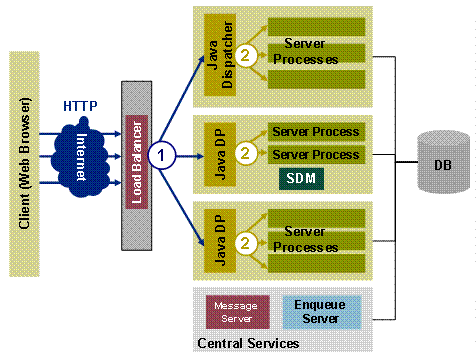
For more
information about the SAP Web Dispatcher concept see the  SAP Web Dispatcher
documentation.
SAP Web Dispatcher
documentation.
Prerequisites
You need Kernel Patch 34.
Procedure
...
1. Configure the Web Dispatcher profile and adjust files icrgroups.txt and urlinfo.txt for the zone definition (see the example files at the end of this section).
icrgroups.txt
File icrgroups.txt consists of 2 sections, separated by an empty line.
 icrgroups.txt (for n zones)
version 1.0 8
J2EE<ClusterID_J2EEDispatcher_1>8
J2EE<ClusterID_J2EEDispatcher_2>8
…
J2EE<ClusterID_J2EEDispatcher_n>8
8 (empty row)
<zonealias_1>:J2EE<J2EEDispatcherClusterID_1>8
<zonealias_2>:J2EE<J2EEDispatcherClusterID_2>8
…
(empty row)
Enter J2EE plus the J2EE dispatcher cluster ID row by row as instance name in the first section of this file.
The J2EE dispatcher registers itself on the message server with the cluster ID when the J2EE Engine is installed. You can for example look for the corresponding cluster ID using the configuration tools.

Make sure that you use the correct notation.
In the second section of the file you define a zone alias and assign one or more instances to this zone. You can assign multiple instances to a zone by inserting a comma as separator between the instances, for example
<zonealias_2>:J2EE<J2EEDispatcherClusterID_2>,J2EE<J2EEDispatcherClusterID_3>,...
You must close file icrgroups.txt with Return, as specified in the syntax. Do not add any additional empty lines or characters.
urlinfo.txt
File urlinfo.txt consists of 1 section without an empty line.
urlinfo.txt (for n zones)
version 1.0
8
PREFIX=/irj~<zonealias_1>/&GROUP=<zonealias_1>&CASE=&VHOST=*.*;&STACK=J2EE8
PREFIX=/irj~<zonealias_2>/&GROUP=<zonealias_2>&CASE=&VHOST=*.*;&STACK=J2EE8
…
PREFIX=/irj~<zonealias_n>/&GROUP=<zonealias_n>&CASE=&VHOST=*.*;&STACK=J2EE8
(empty row)
You must close file urlinfo.txt with Return, as specified in the syntax. Do not add any additional empty lines or characters.
URL
http://host:port/<prefix>/…/…
2.
(Optional)
If files icrgroups.txt and urlinfo.txt are contained in a directory other than the SAP Web
Dispatcher, specify the complete path in the Web Dispatcher
profile.
See also examples for UNIX™ and Windows™.
3. Check if the zone separator is entered for each server node in the J2EE cluster.
The zone separator is a special symbol that is used in the URL to separate the context nodes of the application from the zone (logon group).

irj~za
where ~ is the zone
separator
For more
information see Configuring the Zone
Separator.
Example
icrgroups.txt
version 1.0 8
J2EE84688008
J2EE84699008
8
za:J2EE84688008
za:J2EE84688008
(empty row)
urlinfo.txt
version 1.0
8
PREFIX=/irj~za/&GROUP=za&CASE=&VHOST=*.*;&STACK=J2EE8
PREFIX=/irj~zb/&GROUP=zb&CASE=&VHOST=*.*;&STACK=J2EE8
Web dispatcher
profile
# SAPSYSTEM
must be unique number on physical host
SAPSYSTEM =
66
# use static description files
for logon groups: group info
wdisp/group_info_location =
file://icrgroups.txt
# use static description files
for
# logon groups: url prefixes
wdisp/url_map_location = file://urlinfo.txt
# trace level
rdisp/TRACE
= 1
# SAP WebDisp listen ports
icm/server_port_0 =
PROT=HTTP,PORT=8855,TIMEOUT=120
# Resources
icm/min_threads =
10
icm/max_threads =
50
icm/max_conn
= 500
icm/req_queue_len = 500
# number of backend
connections
wdisp/HTTP/max_pooled_con =
500
wdisp/HTTPS/max_pooled_con = 500
UNIX
path
file:///usr/sap/<SID>/sapwebdisp/icrgroups.txt
Windows
path
wdisp/server_info_location = file://C:\Program Files\SAP\SAPWebDisp\icrgroups.txt