
 Tracing Delta Links Dependencies
Use
The delta link tracer enables you to view the delta link chain of portal objects that comply with the delta link model (see Delta Links).
Being able to resolve the sources of an object allows you to determine from where the current object inherits its content and properties. And, being able to resolve the dependents that are derived as delta links from an object allows you to determine which objects will be directly affected as a result of editing or deleting an object.
Integration
The delta link tracer is accessible from the Portal Catalog and in certain object editors (see Using the Delta Link Tracer). It supports the following object types:
|
· iViews · Portal pages · Worksets · Roles |
· Layouts · Systems · Rule collections · Portal desktops |
Features
Objects in the same delta link chain do not need to reside in the same folder in the Portal Catalog; they can be located in different folders in the Portal Catalog (see figure below). For this reason, it is not possible to determine the sources and dependents of an object without a specialized tool that can analyze the Portal Content Directory (PCD) and provide this information for you. The delta link tracer allows you to do so with great efficiency.
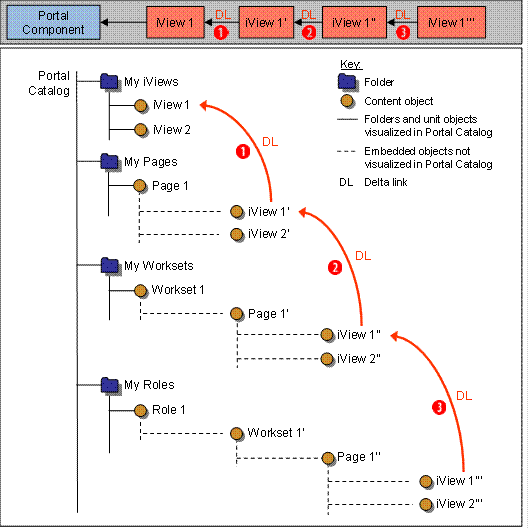
Objects in the same delta link chain (iView 1 to iView 1’’’) can reside in different folders in the Portal Catalog. This can make it difficult to manually locate object dependencies without a tool that is able to do this for you.
Activities
· From the delta link chain displayed in the delta link tracer, you can select any object and use the Locate in Portal Catalog capability to immediately locate the object in the Portal Catalog.
· You can also select an object and quickly view its properties in the Property Editor.
· Any object containing properties that have been modified locally (in other words, properties which no longer inherit their values from their source object in the delta link chain) are easy to identify as they are marked as such in the delta link tracer.
· The delta link tracer considers the permissions of objects. Users only see objects for which they are have permissions.
Example
The following figure shows a collection of objects stemming from the same portal component, which are related to one another through delta links (the object in this case could be an iView):
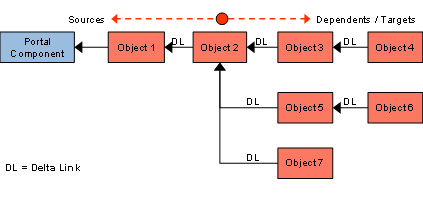
The following table indicates which source and dependent objects are displayed when any of the objects in the previous figure are selected:
Selected Object |
Source objects of selected object displayed in user interface |
Dependent objects of selected object displayed in user interface |
1 |
(No source objects; object is based directly on a portal component) |
2* |
2 |
1 |
3*; 5*; 7* |
3 |
1 ß 2 |
4 |
4 |
1 ß 2 ß 3 |
(no dependents) |
5 |
1 ß 2 |
6 |
6 |
(no dependents) |
|
7 |
1 ß 2 |
(no dependents) |
*These objects have additional dependents in their delta links chain; the tracer only displays the first-generation dependents.