
 Maps
Maps 
Purpose
Many characteristics in the Business Information Warehouse, for example, customer, sales region, and country, contain important geographical characteristics. The geographical information can be evaluated in a map together with the business-orientated, relevant key figures.
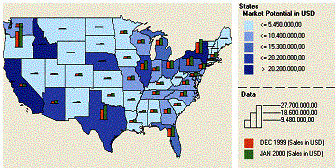
Use maps to visualize business-oriented connections and distributions. You can clearly display specific key figures as color shading, pie charts, or bar charts for a country, a region, or a city.
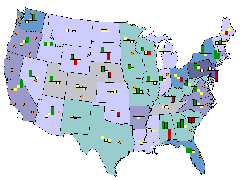
You have the option to change the view of a map in which you either zoom in to display a detailed view or zoom out for an overall view. In this way, it becomes easier to view, for example, the sales analysis of a specific product that refers to a specific region or a country You can recognize the potential or dangers of a market all at a glance.
Integration
Maps help you with reporting geo-relevant data. By using the map Web item, you determine a geographical display in the BEx Web Application Designer for your business-oriented data for the Web application.
Geo-relevant InfoObjects are stored and maintained in the Metadata Repository. The master data for geo-InfoObjects is equipped with geo-attributes. Assigning the range of geographic to business-oriented data (mapping/geocoding) using an external tool: ArcView from ESRI (Environmental Systems Research Institute).
Features
With maps you prepare and evaluate data of a geographical nature (characteristics such as customer, sales region, and country, for example). The geo-relevant data is displayed graphically on a map. Using enhanced navigation options (“geographical drilldown”), regional information can be evaluated more easily at different levels of detail. A map shows the spatial proximity of places and regions, allowing geographical connections to be more clearly represented.
Process Flow
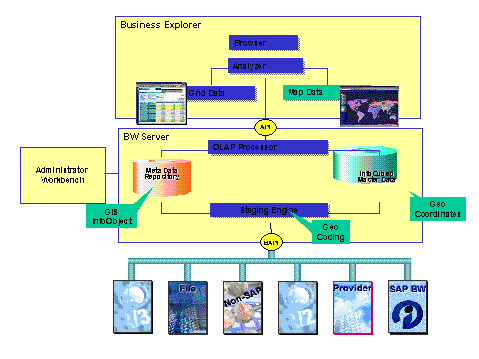
The following graphic illustrates the geographic evaluation of data run by the system:
...
1. In the InfoObject maintenance, flag the geo-relevant characteristics (country, for example) that you want to use as geo-characteristics.
2.
You load the
corresponding  shapefiles into the BW system. You
maintain the assignment of shape file and master data (mapping between
geo-characteristic and shape file). See SAPBWKEY Maintenance
for Static Geo-Characteristics
shapefiles into the BW system. You
maintain the assignment of shape file and master data (mapping between
geo-characteristic and shape file). See SAPBWKEY Maintenance
for Static Geo-Characteristics
If you want to use the maps to report on
geo-characteristics that show information in point form (customer, plant,
sales office, for example) you have to geocode these
characteristics. See Geocoding.
3. In the BEx Web Application Designer you include a map in your Web application and connect these with a data source and a previously-defined query. By using these attributes, you determine the map display and the business-oriented data.
Finally, you publish the application on the Web. You navigate in the map to report further on the geo-relevant data.
See also:
Additional Cartographic Information
Displaying Additional Cartographic Information