Roles and Worksets
Definition
|
Roles |
Worksets |
|
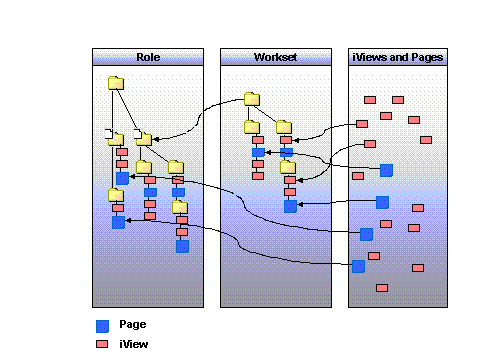
Roles are the largest semantic unit within the content objects. A role is a folder hierarchy comprising other content objects (worksets, pages, iViews). |
Worksets let you bundle iViews and pages in folder hierarchies, like for roles. Worksets represent generic, re-usable structures or modules that can be added to roles. A workset may be used in any number of roles, and a role may consist of a number of different worksets. |
|
The contents of a role are based on the company structure and information requirements of the users of a company. |
Whereas the contents of a role are based on the global company structure, worksets contain user-specific tasks and activities. |
|
Roles are assigned to users. This means that users can only access the content that is relevant for them if they have the appropriate role. |
You may not assign worksets to users. A workset that is to be added to a portal therefore is always part of a role. By setting up a role or a number of roles from a multiple worksets, you define the appearance of the Enterprise Portal for your users. |
|
The role structure defines the navigation structure of the portal for the end user. With the role structure, the administrator defines the entries to appear in top-level and detailed navigation. For more information see Roles and Navigation. |
A navigation structure can also be defined for worksets. However, we recommend that you first add worksets to roles, and then define the navigation structure within the role. |
Use
You can create roles and worksets by creating folder hierarchies and adding content objects to these folders.
Roles can contain the following objects: roles, worksets, pages, iViews as well as templates for pages and iViews.
Worksets contain worksets, pages and iViews, as well as templates for pages and iViews.
Structure