User Management in Your System
Landscape
User Management in Your System
Landscape 
Use
In a multitenant portal, user data for each tenant must be stored a separate client in an ABAP system.

User data stored in an LDAP system is not supported in the multitenant portal scenario. Although it is possible to read data indirectly from an LDAP directory using a Central User Administration (CUA) system, this configuration has not been tested and qualified.

This topic
describes the integration of user management in your system landscape only
where the multitenant portal scenarios deviate from the standard scenarios.
Before reading this topic, we strongly recommend that you read the description
of the standard scenarios at  Integration of User
Management in Your System Landscape.
Integration of User
Management in Your System Landscape.
Integration
Basic Configuration
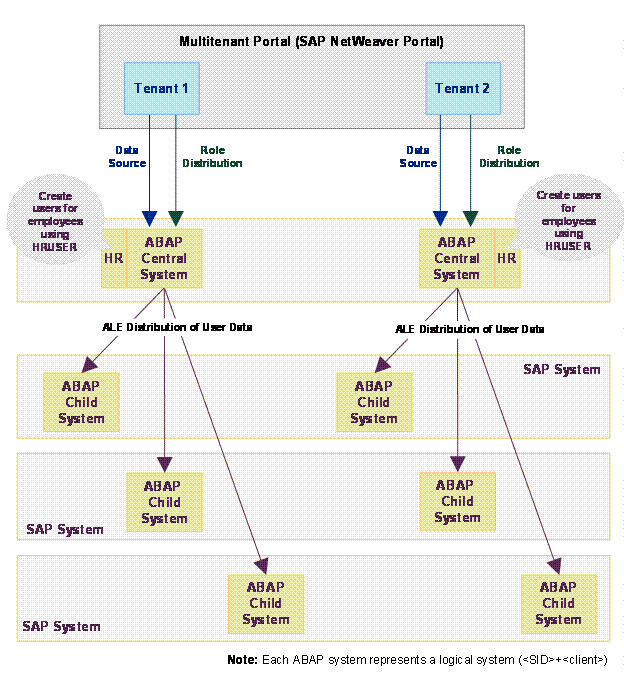
If your multitenant portal integrates applications from SAP systems only, it does not need an LDAP directory in its system landscape. You configure each portal tenant to get its user data from an ABAP client, which also acts as a CUA central client. The CUA then distributes user data to any backend systems integrated in the portal for that tenant.
In the following figure, each tenant connects to an ABAP client, which in turn acts as a CUA central client and distributes user data to SAP logical systems in the backend. Optionally, Human Resources (HR) can also run on each of the ABAP clients to which user management connects. Using transaction HRUSER, administrators can convert HR user records to user records for use by the CUA. The logical systems in the backend can be clients on the same system. For example, each portal tenant can connect to a separate client in an Financial Accounting (FI) system. Alternatively, the logical systems can be separate systems.
The CUA distributes the user data to the logical systems in the backend. As a result, the portal tenant and the backend systems have the same user base, and users have the same user IDs in both the portal and the backend systems. This facilitates the use of single sign-on (SSO) with applications from the backend systems that are integrated in the portal.
If you add a standard (non-multitenant) portal to an existing landscape, do not use a CUA central client as data source for the UME. Doing so would allow all users in the CUA, rather than only portal users, to log on to the portal.
Conversely, in a multitenant portal, the whole system landscape is installed and administered for the customer by the service provider. In most cases, all users will access applications through the portal; therefore, all users in the CUA must be able to log on to the portal. For this reason, we recommend that you use the CUA central client as data source for the UME.
Advanced Configuration
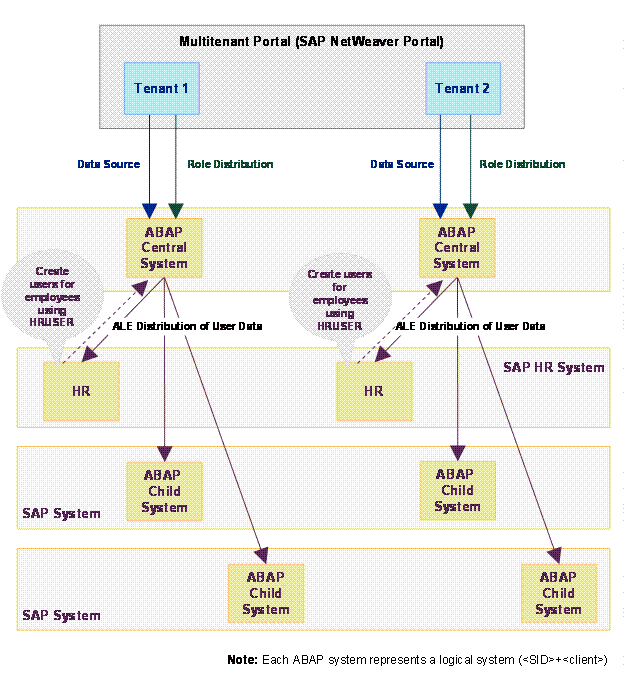
With larger landscapes, performance reasons dictate setting up a more complex system landscape, as illustrated in the following figure. This kind of landscape makes sense if:
· You have many users for which you create system-specific role assignments in transaction SU01 in the CUA system
· You have many child systems for your CUA
In the following figure, the HR system is no longer on the same system as the CUA. Instead, the HR system is one of several child systems of the CUA central client. If employees are created in the HR system, the administrator must create user records from them using transaction HRUSER. This information is distributed back to the CUA central client.