Overriding Attributes
Use
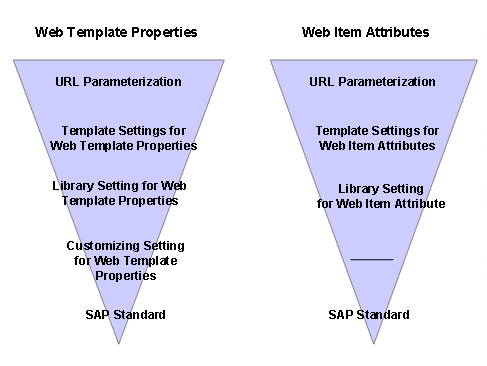
All attributes for Web items and all Web template properties can be overridden. At the time of execution, the respective attribute value is specified for Web items, corresponding to the sequence
URL->Object Tag in Web Template -> Library Web Item -> System Default
of the corresponding attribute value. This is likewise valid for the Web template properties. Here the specification occurs, corresponding to the sequence
URL-> Web Template Properties -> Library Web Item -> Web Template Properties defined in Customizing for the Business Information Warehouse under Web-based Settings -> System Default.
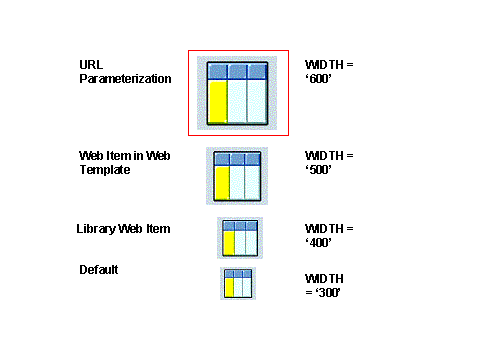
Example of the Web item attribute WIDTH (Width in Points) for the Web item Table
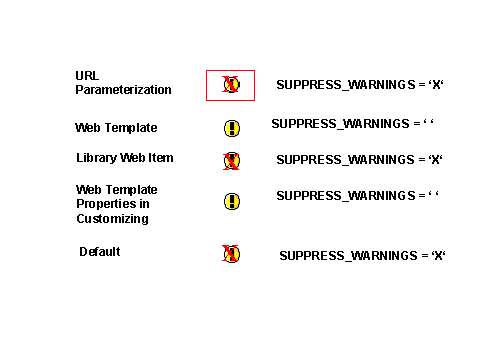
Example of Web template property SUPPRESS WARNINGS
General Rules for Overriding Settings
The following graphic shows the priority rules when overriding settings of the Web template properties and the Web item attribute.