5.11.5 Determining Parameters for Transactions 
When an OBN call is mapped onto a transaction, parameter mapping is still possible. Use the technical information to determine the screen field names (as is usually used for batch input) for the startup screen of the target application. If all fields are available, the start screen fields are filled and the transaction sprints to the next field.
For example, assume that we wish to start transaction SU01 to show the information for the user ANZEIGER. As a first step, start the transaction in SAP GUI and determine the screen field name. In this example, we see that the value is USR02-BNAME.
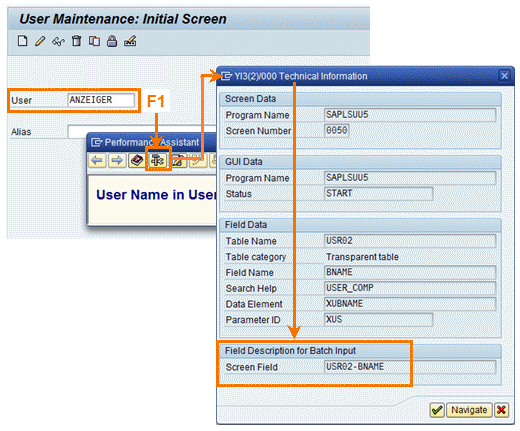 (Screen Field)
As a next step, the OKCode for the next screen must be determined. The simplest approach is via the menu path  System
  Status...
  and then double click on the GUI
Status field. This will lead to a status editor that will show all the OKCodes possible on this specific dynpro under Function Keys.
and then double click on the GUI
Status field. This will lead to a status editor that will show all the OKCodes possible on this specific dynpro under Function Keys.
 (Function Keys)
It is recommended to test the screen field names with values using the SAP GUI for HTML. The startup URL of the SAP GUI for HTML has the following format:
http://server:port/sap/bc/gui/sap/its/webgui?~transaction=*<TCODE><SPACE><P1>=<V1>;<P2>=<V2>;<P3>=<V3>;DYNP_OKCODE=<CODE>
For this example, we could test with the following URL (using %20 as URL encoding of a space character):
http://server:port/sap/bc/gui/sap/its/webgui?~transaction=*SU01%20USR02-BNAME=ANZEIGER;DYNP_OKCODE=SHOW
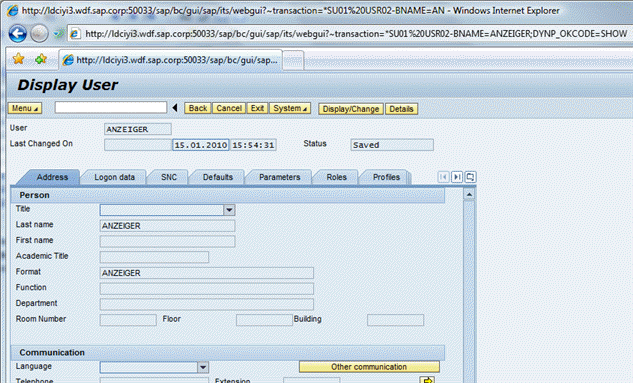 (SU01 in browser)
With this data, it is now easily possible to define an OBN target onto a transaction. Let us assume that the OBN interface User.Display( username:string ) has to be mapped. For the Dynpro OKCode a normal static parameter is added in the OBN mapping. This parameter will then automatically be added to the startup parameters for the transaction.
User.Display( username:string ) -> SU01( USR02-BNAME={username} DYNP_OKCODE=SHOW )
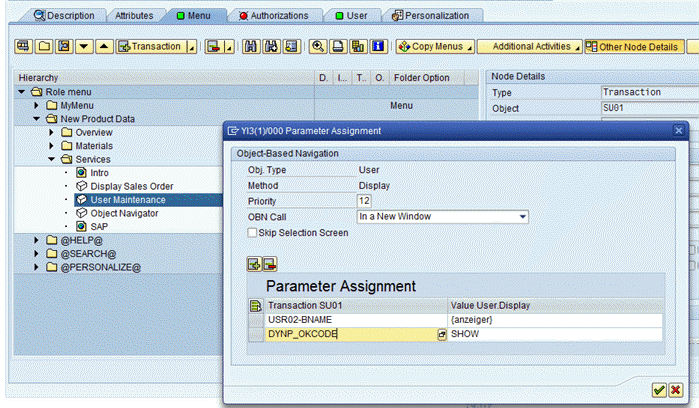 (parameter mapping)
 Caution
For an OBN call onto a transaction, in all cases always define the transaction as a transaction code. Do not specify directly an SAP GUI for HTML URL! For the OBN parameter mapping, in all cases we use standard URL encoding formats. The NWBC runtime will transform the standard URL formats into the specialized format required by the SAP GUI for HTML.